
Cable Selection
Simplex vs Duplex Fiber Cable: What's the Difference
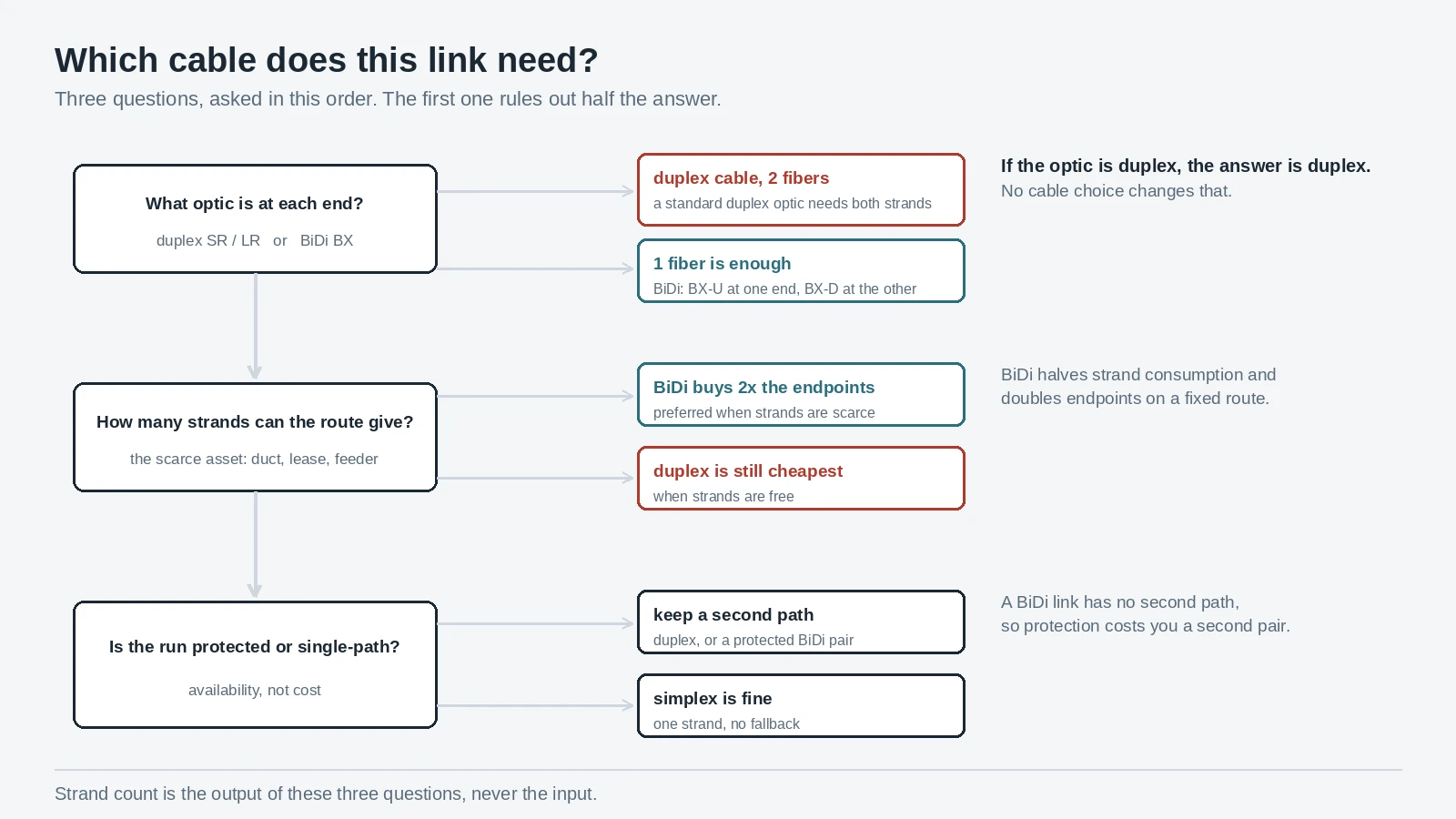
Short answer: a simplex fiber cable carries one strand and a duplex fiber cable carries two, and the choice is made by the transceiver at each end, not by the cable. A standard duplex optic needs two fibers — one transmits, one receives. A BiDi optic puts both directions on a single strand at two different wavelengths, so one fiber is enough. Get that pairing right and the cable is the cheapest, most forgiving part of the link.
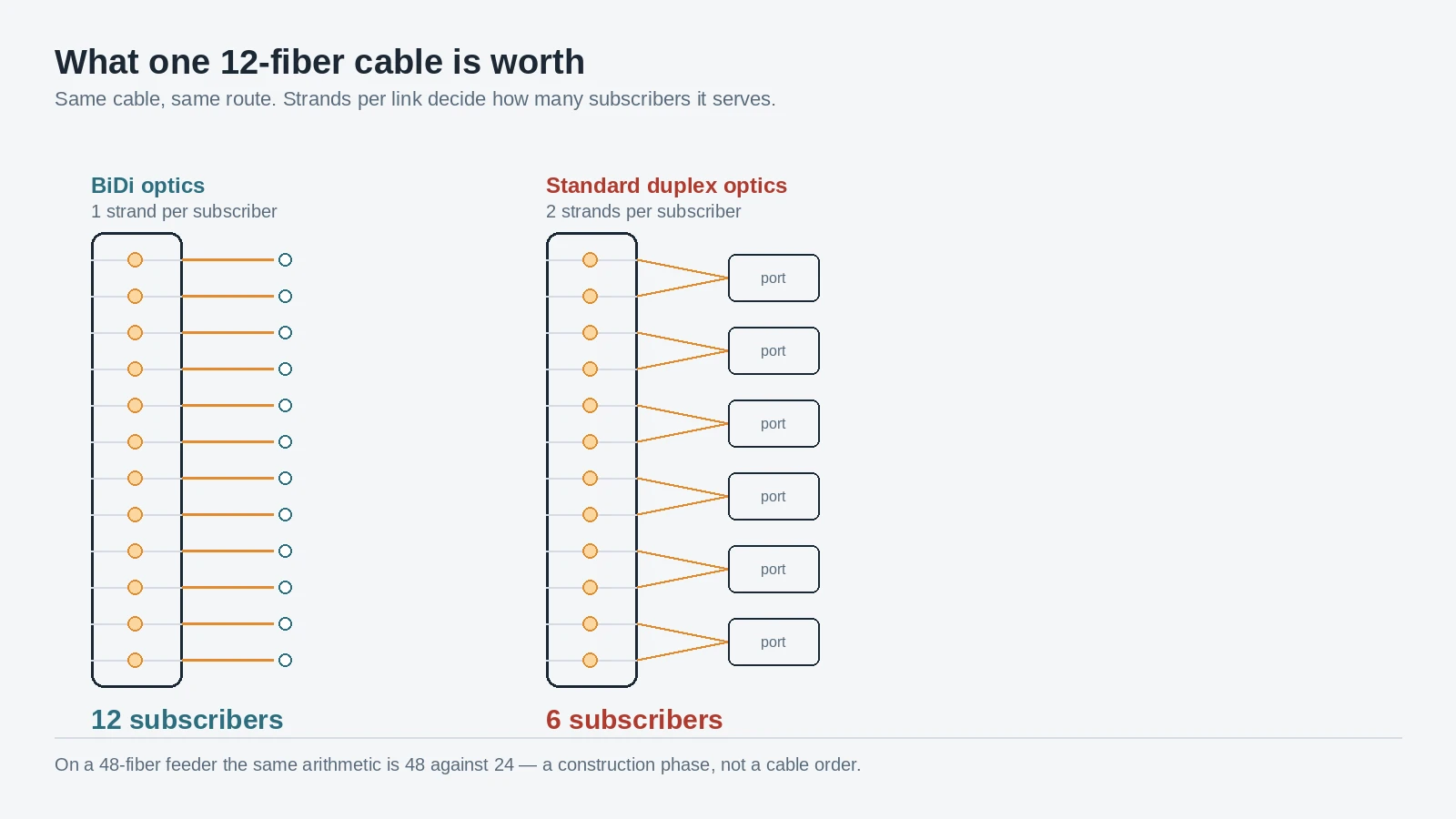
The number that follows from it is the one this article is built around: halving the strand count doubles the number of subscribers, ports or links a fixed fiber route can serve. On a 12-fiber cable that is twelve endpoints with BiDi against six with duplex optics. Most writing on this topic stops at the definition and never does that arithmetic, which is why it reads like a glossary instead of a buying decision.
The rest of this page is the specification work: vocabulary, transceiver pairing, strand arithmetic, polarity, jacket construction, loss budget, and the line items for a purchase order. Where the decision belongs to a broader choice — grade, fire rating, application — the cable selection guide holds the map.
Three words that are not the same word
Most of the confusion in this topic comes from one word doing three jobs.
Strand count. Simplex means one fiber inside the jacket; duplex means two, usually joined by a web of jacket material (the "zipcord" look) or by a clip at the connectors. This is a mechanical property of the cable and it says nothing about which way the light travels.
Duplex mode. A simplex circuit carries traffic one way only. A half-duplex circuit carries traffic both ways but not at the same time. A full-duplex circuit carries both directions simultaneously. Those are properties of the communication, and any of the three can ride on a one-fiber cable if the transceivers at each end agree on how to do it. The reference summary of duplex communication describes the traffic, not the hardware.
Fiber mode. Single-mode or multimode is the core geometry — 9 µm glass for OS2, against 50 µm for OM3 through OM5 and 50 or 62.5 µm on legacy OM1 and some OM2. Completely independent of strand count: a single-mode simplex fiber optic cable and a multimode duplex cable are both ordinary products.
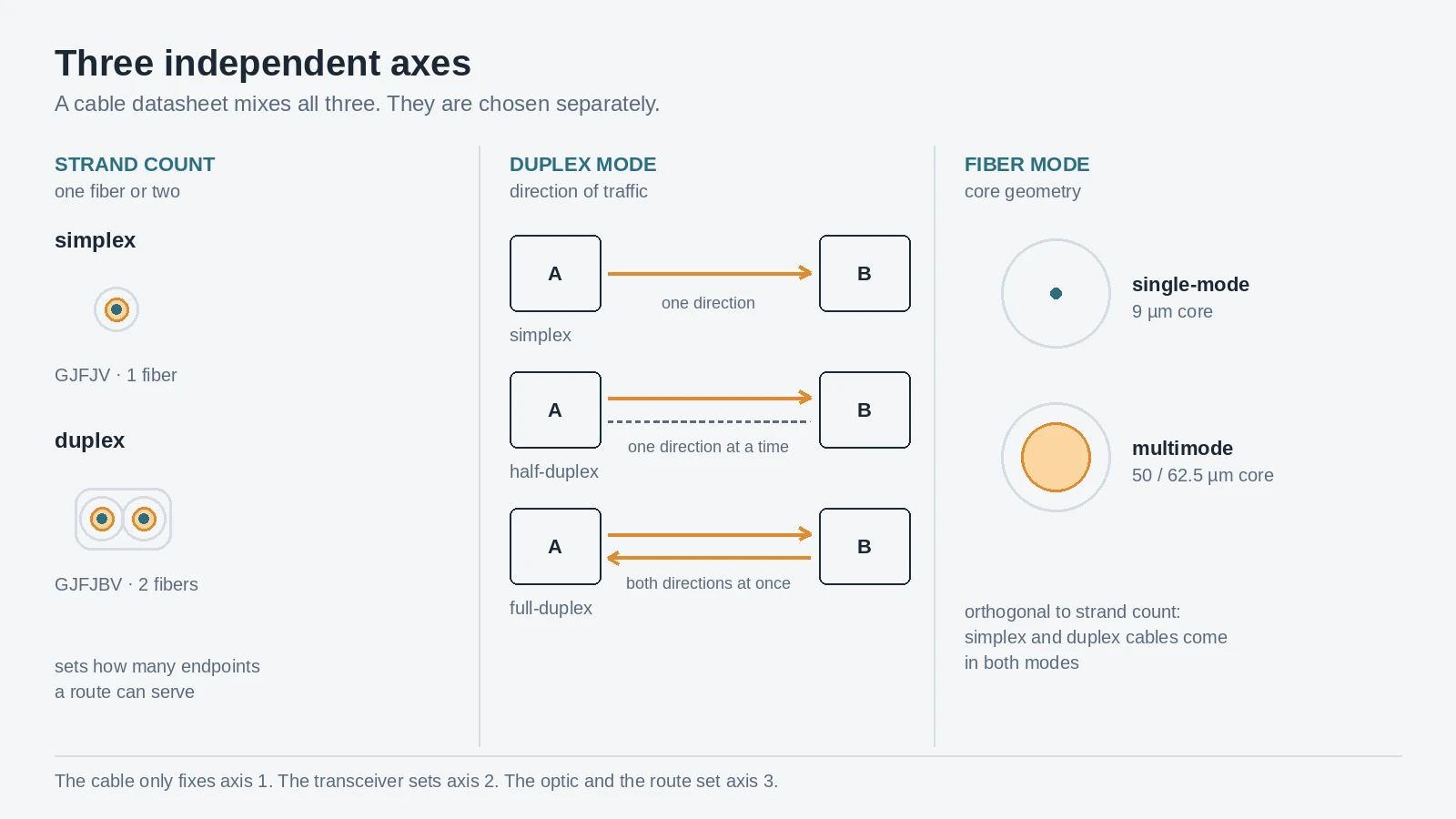
That independence answers the two questions people most often get wrong. Duplex is not the same as multimode — a duplex LC connector appears on single-mode and multimode assemblies alike, and single-mode duplex fiber optic cable is a standard catalogue item, as is multimode simplex. If a datasheet uses "duplex" to mean multimode, the datasheet is wrong.
Axis | Ordinary values | What actually sets it |
|---|---|---|
Strand count | simplex (1), duplex (2), ribbon / multi-fiber | the optic in the port |
Duplex mode | simplex, half-duplex, full-duplex | how the two endpoints share the medium |
Fiber mode | OS2 single-mode; OM3, OM4, OM5 multimode | reach, optics cost, existing plant |
The corollary catches experienced people too: a simplex cable does not mean simplex transmission. Fit BiDi transceivers and a single strand carries full-duplex traffic in both directions at once. This is the most expensive misunderstanding in the topic, because it makes buyers rule out single-fiber designs on a definition rather than on a budget. Where the mode decision itself sits — reach, transceiver cost, migration — is a separate choice, worked through in single-mode vs multimode fiber.
The optic picks the cable, not the other way round
Start at the transceiver. Every optics datasheet states, in the port description, how many fibers it needs.
A conventional duplex optic has two ports: transmit on one, receive on the other. 10GBASE-SR and 10GBASE-LR, 1000BASE-SX and 1000BASE-LX, 25GBASE-SR, the LC versions of 100G LR4 — they all want a pair, one fiber each way. Duplex fiber cable is the normal medium for them, which is why duplex dominates every data hall and enterprise riser: the installed base of optics wants two strands.
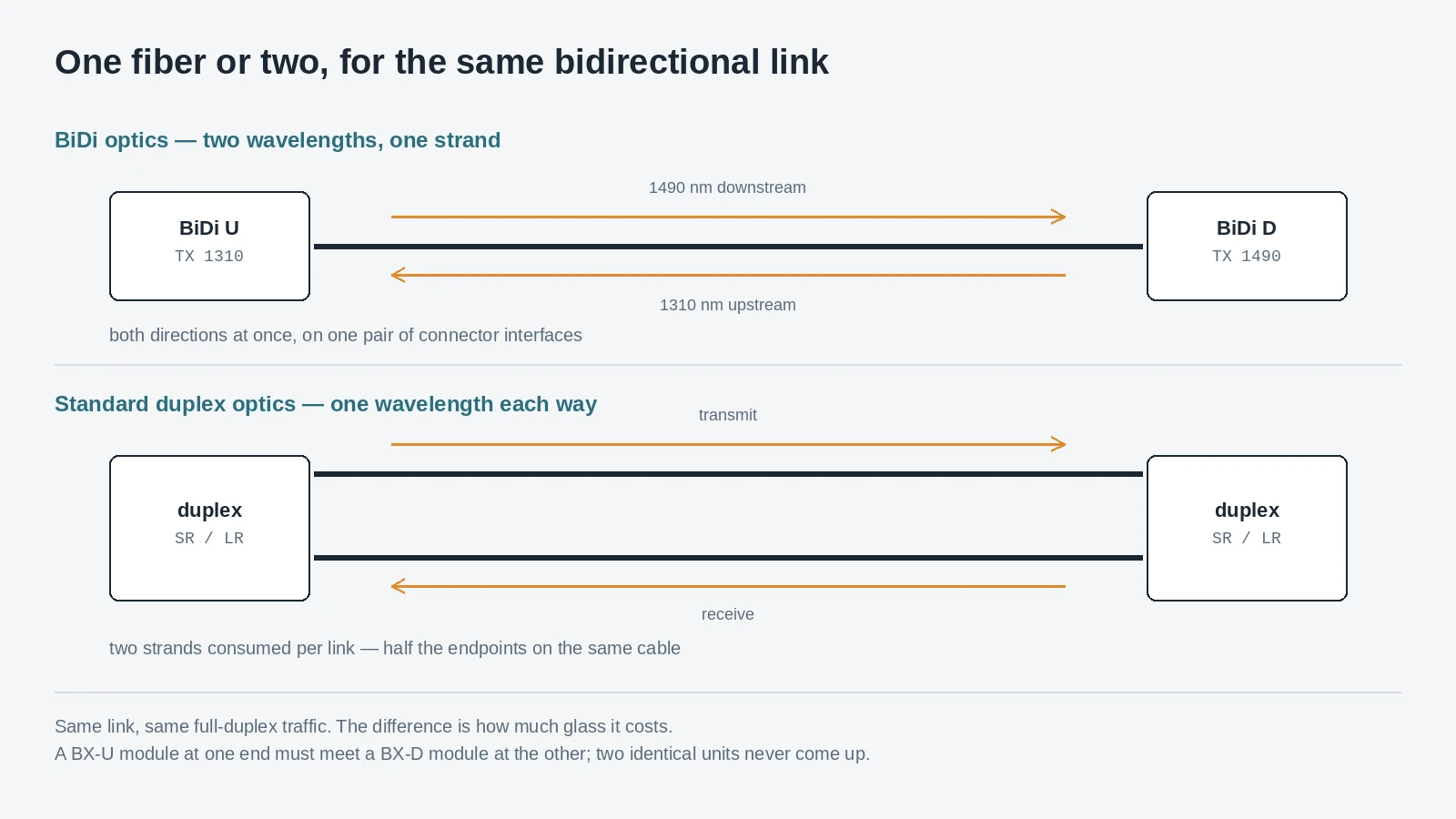
A bidirectional optic does the opposite. It transmits on one wavelength and receives on another, combining and separating them inside the module, so both directions share a single strand. The ITU-T GPON family defines exactly this shape — a single-fiber design with the downstream at 1490 nm and the upstream at 1310 nm, as the GPON specification summary sets out — and Ethernet has its own single-fiber equivalent in the 1000BASE-BX family, sold as a matched pair with BX-U at one end and BX-D at the other.
Two consequences matter to a buyer:
- The cable cannot fix the wrong optic. If the optic is a duplex type it needs two physical paths. If it is BiDi the second fiber stays dark — and on a long pull, that dark strand is money already spent.
- The cable is not where the cost is. The assembly delta between one fiber and two is small next to either the transceiver choice or the outside-plant delta between 12 and 24 strands. Decide the optic first; the cable follows for very little.
LC is the default on both simplex and duplex assemblies at 10G and above; SC survives on older single-mode plant and some PON equipment. LC vs SC connectors covers that trade — the relevant point here is that a duplex pair is two LC bodies held by a clip, which behaves differently in a panel than two separate cords.
Pairing a BiDi link: the mistake that looks like a dead port
BiDi links fail in a specific, repeatable way, and the failure looks like a hardware fault rather than a wiring error.
Each BiDi module transmits on one wavelength and receives on the other. The module at the far end must be its complement: if one end transmits at 1310 nm and listens at 1490 nm, the other must transmit at 1490 and listen at 1310. Fit two identical units — two BX-U modules, or two modules pulled from the same box without checking the suffix — and both ends transmit on the same wavelength into the same strand. Neither receives anything. The port reports no light, the link stays down, and the natural next step is to suspect the module, the patch cord or the far-end switch.
The rule fits on a label: one U, one D. Order the pair as a pair, mark the ends U and D or TX1310 and TX1490, and keep the marking visible at both ends, because the next technician to touch the link will not have the purchase order in hand. A PON enforces the same logic by standard: the OLT transmits downstream at 1490 nm and every ONT upstream at 1310 nm, which is why the two are never interchangeable.
One asymmetry is worth knowing before the architecture is fixed. Because both directions ride the same glass, a BiDi link has half the splice and connector count of an equivalent duplex span — but no second path to fall back on. A duplex pair that loses one strand can sometimes be re-patched onto a spare pair in the same trunk and kept in service at reduced capacity; a single-fiber link that loses its strand is simply down. That is a real availability argument for duplex on protected routes, and it belongs in the same conversation as the strand arithmetic below.
Where simplex wins: the strand arithmetic
This is the whole economic case, and it is arithmetic rather than opinion.
Fiber in the ground, in a duct, or on a leased route is the scarce asset. Count what a fixed fiber count buys:
Route fiber count | Endpoints with duplex optics | Endpoints with BiDi optics |
|---|---|---|
12 | 6 | 12 |
24 | 12 | 24 |
48 | 24 | 48 |
96 | 48 | 96 |
Every BiDi link converts one strand into one endpoint. Every duplex link converts two. On a 48-fiber feeder the difference is twenty-four subscribers — not a rounding error, a second construction phase you either fund now or fund later. On leased fiber or an irreplaceable duct, the same arithmetic decides whether the route can be sold twice.
PON is where this stopped being a niche argument. A GPON access network is single-fiber by design: one strand from the OLT through a splitter to each ONT, with 1490 nm downstream and 1310 nm upstream sharing the glass. That is why the drop cable at the end of a PON is naturally a simplex assembly, and why a flat one-fiber drop is the standard shape of FTTH in most of the world. The FTTH drop cable guide covers the construction side; the point here is that the single strand is not a compromise, it is what the architecture was designed around.
Three situations make simplex the better purchase even outside a PON:
- Leased or scarce fiber. When the strand is rented, or the duct is full and a new one is not an option, halving consumption is worth more than the transceiver premium.
- Long one-way runs. Sensor feeds, pipeline monitoring, SCADA and CCTV over fiber need one direction only. A simplex cable is the correct, cheaper assembly; a duplex pair leaves half of it unused.
- Test leads and instrument patches. One fiber, one connector, no second end to keep track of.
What simplex does not win is anything governed by a standard duplex interface, which is most switch ports on earth. BiDi is an architecture decision — made at the OLT, the switch, or the design stage — and once the architecture is duplex, no amount of cable cleverness converts it.
Where duplex wins: everything that is not a PON
Duplex is the default because the optics installed in buildings expect it. A switch port with an SR or LR module wants two fibers, transmit on one and receive on the other. Server NICs, storage arrays, firewall HA pairs, enterprise risers, cross-connects between patch panels: the interface at both ends is a duplex pair, and a duplex cord is the assembly that fits it without adapters or a change of optic.
Two boundaries are worth drawing, because they are where the "duplex vs simplex" framing quietly stops applying.
Parallel optics. Parallel-lane interfaces change the shape: 40GBASE-SR4 and 100GBASE-SR4 use eight of the twelve fibers in an MPO-12 — four lanes transmitting, four receiving — and MPO-12 cabling is the standard way to land them. Their long-reach siblings do not: 40GBASE-LR4 and 100GBASE-LR4 are duplex LC, as noted above, and so are the duplex single-mode reaches in general. A parallel link is neither duplex nor simplex but a third case, where polarity becomes a mapping problem rather than a crossing. The MPO polarity guide covers the A/B/C methods for that case, and it is where a data-center designer ends up once they move to parallel optics from 40G upward.
Fronthaul. CPRI and eCPRI links between a baseband unit and a remote radio head are duplex LC pairs in the great majority of deployments — two fibers, one each way, from the BBU cabinet to the tower-top radio. That makes FTTA one of the largest remaining duplex markets, and it is a duplex decision made for reasons that have nothing to do with strand cost at the tower.
Simplex is an access-network and fiber-scarcity answer; duplex is an equipment-interface answer. The overlap — a campus distribution frame, a leased metro span — is exactly where the arithmetic above should be run.
Polarity: the crossing has to happen somewhere
A duplex link carries transmit on one strand and receive on the other, at both ends. Both ends use the same transceiver model, so both have their transmit port in the same physical position. If a cord connects position one to position one along its whole length, transmit arrives at transmit and the link never comes up.
The crossing has to be built in somewhere, and in duplex fiber cabling it is built into the cord: a standard duplex patch cable is crossover-wired, so position one at one end lands on position two at the other. TIA-568 is the structured-cabling standard family that governs these links, and within it TIA-568.3-D is the part that carries the fiber polarity conventions — the crossover rule itself is standard practice rather than a vendor preference. The practical consequence for a buyer is that the cord type is part of the link, not an accessory. The failure mode is not a dim link — it is a row of ports all transmitting into their neighbours' receivers, which is how a whole panel goes dark from one wrong cord type.
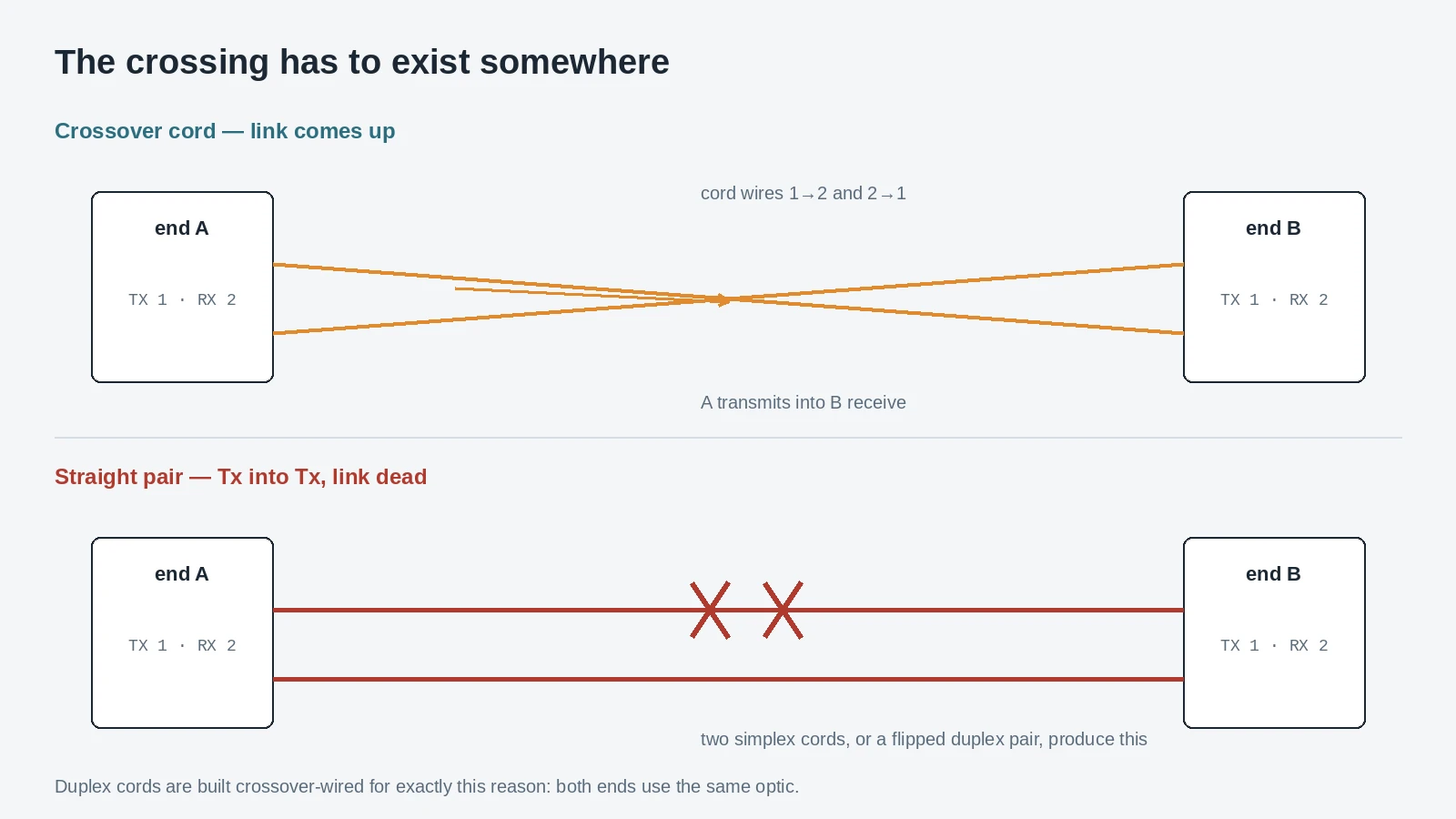
Four things keep it straight in the field:
- Do not build a duplex link from two simplex cords. Two simplex assemblies produce a straight pair, not a crossover. It looks tidier in the panel and it does not work.
- Check the clip orientation when you re-terminate. A duplex clip holds two LC bodies; flip one body and the pair changes from crossover to straight.
- Uniboot changes the rule. A uniboot LC puts both fibers in one housing with one cable, and polarity is set by the connector's internal routing — often field-switchable, which is a feature to specify explicitly rather than discover on site.
- Test both directions, not just one. A link can pass one way and fail the other if a strand is damaged or a connector is contaminated. One-way testing is how a bad pair gets signed off.
If your team is already working through patch-cord specification, fiber optic patch cord types treats polarity as one of four independent axes of the assembly — worth reading alongside this section, because it covers the cases where the cord, not the cable, is the thing being ordered.
Simplex vs duplex fiber cable: weight, tensile and crush
Everything above is about light. This section is about the object you buy, and here the two constructions are not simply "one of these and two of those."
The figures below are the manufacturer datasheets for the five builds that cover most indoor and patch-cord demand. All five are tight-buffered: a 250 µm fiber is coated out to 900 µm (or 600 µm) so the assembly can be connectorised and handled without the bare glass ever being exposed, which is what separates a patch-cord cable from an outdoor loose-tube cable.
Fibers | Construction | OD (mm) | Weight (kg/km) | Tensile, short/long (N) | Crush (N/100 mm) | Bend radius, dynamic/static | |
|---|---|---|---|---|---|---|---|
GJFJV simplex round | 1 | round, 900 µm tight buffer | 1.8 / 2.8 | 2.5 / 3.5 | 100 / 60 | 500 / 100 | 20D / 15D |
GJFJBV duplex flat | 2 | flat twin, 600–900 µm tight buffer | 3.0 × 5.4 / 3.8 × 7.0 | 13.8 / 20.0 | 200 / 100 | 500 / 100 | 20D / 15D |
Duplex figure-8 | 2 | figure-8 twin | 1.8 × 3.7 / 2.8 × 5.8 | 8.2 / 11.6 | 200 / 100 | 500 / 100 | 20D / 15D |
GJSJV simplex armoured round | 1 | steel tube + braid | 1.8 / 2.8 | 16.0 / 18.5 | 400 / 200 | 2000 / 1000 | 20D / 15D |
GJSJBV duplex armoured flat | 2 | steel tube + braid, flat twin | 3.0 × 5.4 / 3.8 × 7.0 | 35.5 / 38.5 | 1000 / 300 | 2000 / 1000 | 20D / 15D |
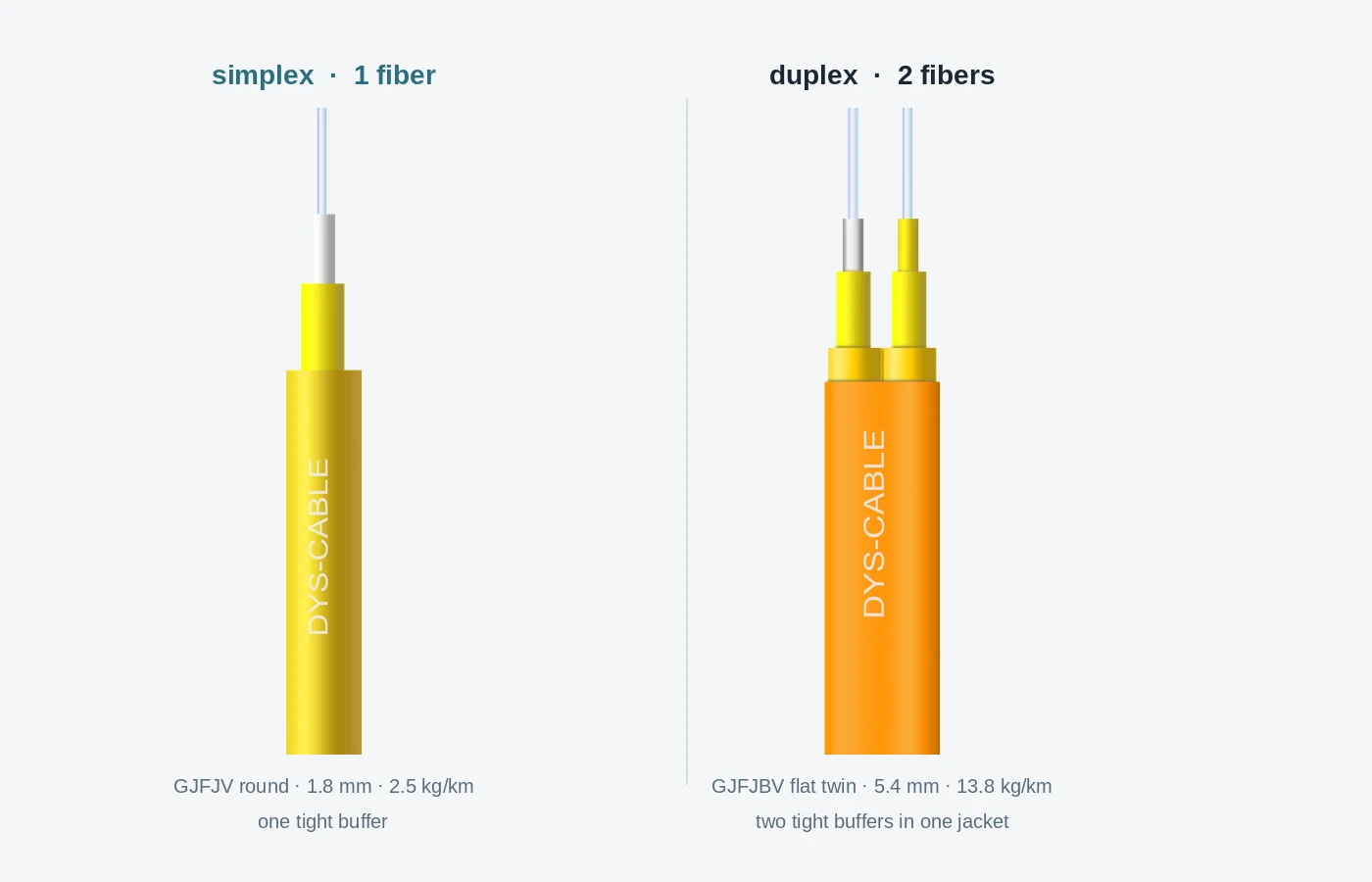
Three findings in that table are not obvious from the words "one fiber or two":
The duplex flat twin is 5.5 times the weight of the simplex round cable, not twice. Two buffered units, the flat jacket around them and the web between them add up to 13.8 kg/km against 2.5. If you are hanging assemblies in a tray, calculating tray fill, or paying for duct occupancy, the ratio that matters is not 2:1.
Construction changes the ratio more than strand count does. The figure-8 build is 8.2 kg/km at a smaller overall section — 1.8 × 3.7 mm against 3.0 × 5.4 mm — so part of the difference is simply how much jacket goes around each fiber. The datasheet does not state a cause. When duplex weight is the problem, price a different duplex construction before you change the fiber count.
Armour multiplies tensile by four or five and crush by four. A steel tube and braid take the simplex build from 100 N to 400 N and the duplex from 200 N to 1,000 N, at 35.5 kg/km. That is the build for a riser with a rodent problem or a route someone will stand on; not the build for a patch panel.
All five share a 20D dynamic and 15D static bend radius and a −20 to +60 °C range, so the choice between them is about handling and protection, not optical behaviour.
Connectors and panels: where duplex spends rack space
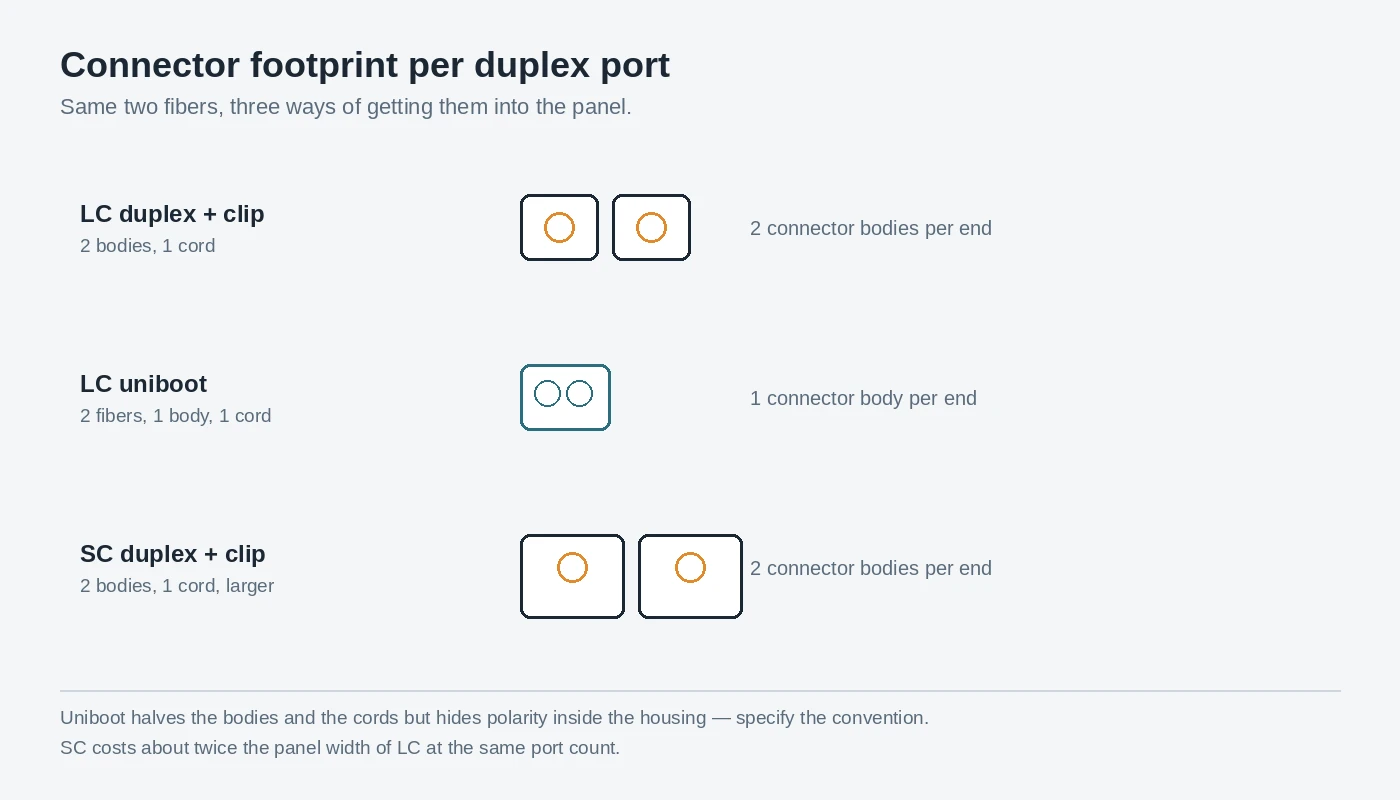
A duplex link needs two connector bodies per end. In a 1U panel that is fine; in a high-density switch row it is what decides the panel, not the fiber.
Three interfaces answer it:
- LC duplex with a clip — two LC bodies, one clip, one cord per port pair; the default everywhere.
- LC uniboot — two fibers into one LC housing on one cord, so half the connector bodies and one cord to dress.
- SC duplex — two SC bodies clipped, still common on single-mode plant and older PON equipment, roughly twice the LC panel footprint.
The trade is the one described in the polarity section: uniboot halves the bodies and the cords, and puts the crossover inside a housing where nobody can see it. On simplex links the panel problem disappears entirely — one simplex LC per end, half the ports per U.
Does one fiber change the loss budget?
No, and the reason is worth two minutes because it decides how much testing you schedule.
A loss budget is built per optical path: fiber attenuation over the length, a splice allowance, and a connection allowance at each end. The FOA's loss-budget reference gives the working numbers — multimode connections at 0.2–0.5 dB typical, factory-made single-mode at 0.1–0.2 dB, 0.3 dB for a typical adhesive-and-polish connector, and 0.75 dB as the TIA-568 maximum acceptable. Designers often plan at 0.5 dB per mated pair for margin; that 0.5 dB figure is a design judgement, not a standard. The same page carries one piece of vocabulary worth keeping: connectors have no loss of their own, only connections do — two LC bodies joined by an adapter count as one connection.
None of that changes with strand count. A duplex link has two paths, one per direction, each carrying a connection at each end; a BiDi link has one path with a connection at each end. Per path, the arithmetic and the budget are identical.
What changes is the number of paths and how a fault presents:
Duplex link | BiDi link | |
|---|---|---|
Optical paths per link | 2 | 1 |
Connector pairs per path | 2 (one at each end) | 2 (one at each end) |
Traces to record | 2 per link | 1 per link |
Blast radius of one bad strand | one direction; may be re-patched onto a spare pair | the whole link |
The failure scope matters more than the trace count. On a duplex link two paths look like one service from the customer's side, so a technician who measures a single direction can sign off a link that is half broken.
Bidirectional measurement makes either one honest: splice and connector loss read differently depending on which end you shoot from, so a one-way OTDR trace is an estimate and a two-way average is a measurement. The FOA's testing reference covers the sequence, and insertion loss vs return loss explains what the two numbers on your tester mean. Two things are not negotiable whichever strand count you choose: inspect and clean every end face before mating, and never look into a fiber or an adapter port — the light is invisible and the damage is permanent.
What to put in the RFQ
Most simplex vs duplex arguments are settled by a purchase order that was too vague to compare. Require these line items and the ambiguity disappears.
Item | What the specification must state |
|---|---|
Strand count | 1 or 2 per assembly, stated separately from jacket style |
Fiber | OS2 / OM3 / OM4 / OM5, and the grade (G.652.D, G.657.A1/A2 where bend-insensitive) |
Construction | round, flat twin, figure-8, or armoured; OD and weight per km |
Jacket | PVC, LSZH, OFNR or OFNP, with the fire rating the installation space requires |
Connector | LC or SC, simplex or duplex, uniboot if panel density requires it |
Polish | UPC or APC, with the return-loss grade the link requires |
Polarity | crossover for duplex, and how it is marked on the assembly |
BiDi pairing | for single-fiber optics: which end is U and which is D, on the label |
Mechanical | tensile short/long term, crush resistance, minimum bend radius dynamic/static |
Testing | attenuation per fiber at the operating wavelength, end-face inspection, report per shipment |
Delivery | reel or coil length, marking legend, labeling of each end |
Two rows are the ones buyers forget. Polarity is a property of the assembly that has to be ordered, not adjusted later; BiDi pairing is the difference between a working link and a service call. A supplier who cannot state both in writing is not ready to quote a single-fiber or duplex project. How to spec fiber optic cable in an RFQ turns the table into a full document.
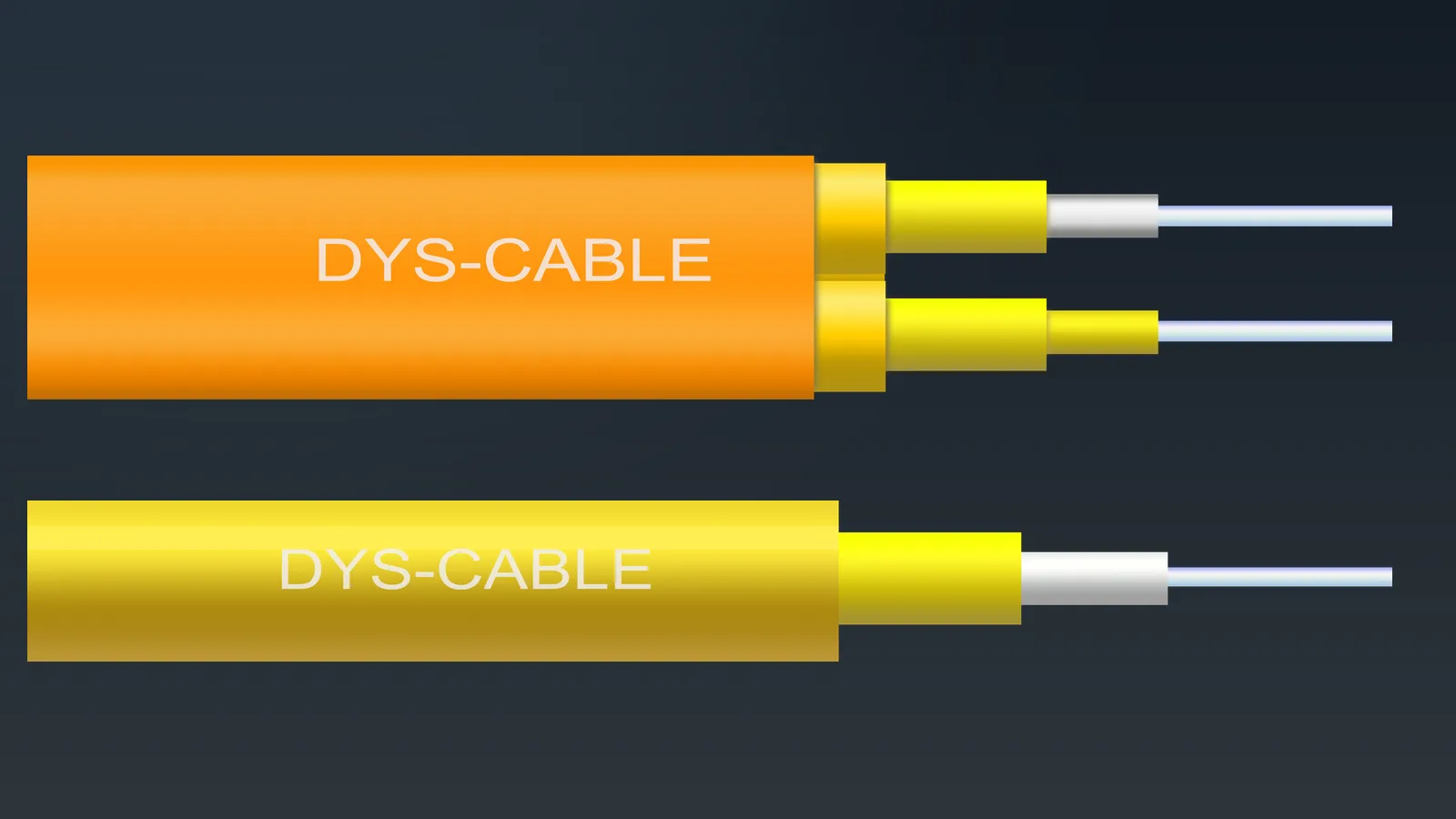
DYS builds the simplex and duplex families above — GJFJV simplex round, GJFJBV duplex flat, the figure-8 duplex and both armoured variants — so these constructions can be quoted against one set of datasheets rather than three suppliers' incompatible formats.
When each fits
Scenario | Simplex | Duplex | Why |
|---|---|---|---|
FTTH drop to an ONT | ● | PON is single-fiber by design; one strand per subscriber | |
PON feeder / distribution | ● | Strand count is the scarce asset; splitter economics favour one fiber | |
Switch-to-switch, duplex optics (1G–25G SR/LR; 40G/100G LR4) | ● | a duplex optic wants a transmit and a receive path | |
40G/100G/200G SR4 | neither — eight fibers in an MPO-12 (parallel optics) | ||
Campus or building backbone | ● | Equipment interfaces are duplex; protection pairs are duplex | |
Leased fiber or full duct | ● | Halving consumption beats the optic premium | |
Sensor, SCADA, CCTV, one-way | ● | Traffic is one direction; a pair wastes half the assembly | |
CPRI / eCPRI fronthaul | ● | Duplex LC is the standard interface at the radio | |
Test leads and instrument patches | ● | One fiber, one end, no second path to track |
Three questions buyers ask first.
Which is better, simplex or duplex? Neither — they answer different questions. Duplex fits the optics already installed in buildings; simplex buys strands on routes where strands are the constraint. If the optic is a duplex type, simplex is not an option at any price.
Can a simplex fiber cable support full-duplex communication? Yes, with BiDi transceivers at both ends: transmit and receive share one strand at two wavelengths and run simultaneously. The cable is one fiber; the link is full-duplex. What it cannot do is carry a standard duplex optic.
Can I use a duplex cable for a simplex application? Yes — use one strand and leave the other dark, provided the optics at both ends are single-fiber types. It is a normal way to keep one part number in stock, and the cost is the unused strand.
If the design is still open, the two numbers that decide it are not cable numbers: how many strands the route can give you, and what optic every endpoint is specified with. Send those two to our engineers with the route length and we will tell you which construction and which strand count the build supports.