
Fiber Basics
Ethernet vs Fiber: When Copper Still Makes Sense
The question arrives with something specific behind it: a quote for a building fit-out, a link that keeps failing a channel test, a camera that needs to go 200 meters from the nearest switch. And it is usually asked as "ethernet vs fiber", as though these were two competing technologies you pick between at a crossroads.
They are not. Ethernet is a family of standards that defines how frames are built and how bits go onto a wire or a strand of glass. Fiber is one of the two media those bits can travel over. A fiber link is still an Ethernet link. Once you see that, the question changes from "which technology wins" to something you can actually answer at a desk: which physical layer does this particular run need?
That is the question this page works through. It is also a question with a commercial answer, so the disclosure goes here rather than at the bottom: DYS manufactures fiber cable, which makes us an interested party in the fiber half of this article. The copper arguments in sections five through seven are the ones we would have to answer in a real bid, and they are the reason this page does not end with "use fiber everywhere".
What "Ethernet" and "Fiber" Actually Name
The IEEE 802.3 working group defines Ethernet as a set of standards covering both the framing rules and a long list of physical layers — the electrical or optical signaling schemes that carry those frames. Copper twisted pair is one family of physical layers. Glass is another. Both are Ethernet.
The naming convention tells you which one you are looking at, and it is worth thirty seconds because it turns a spec sheet into a readable document. Take 10GBASE-SR:
- 10G is the line rate.
- BASE means baseband signaling, as opposed to the broadband schemes of the 1980s.
- The suffix is the medium.
-Tis twisted pair:1000BASE-T,10GBASE-T.-Sis short reach over multimode fiber,-Lis long reach over single-mode,-Eis extended reach.10GBASE-SRand10GBASE-LRare both 10-gigabit Ethernet; they differ in the glass they expect and how far they can push it.
So when a switch datasheet lists eight SFP+ cages and four 10GBASE-T ports, it is not offering you two networks. It is offering you two kinds of port, both of which speak Ethernet, one expecting a transceiver and a fiber patch cord, the other expecting an RJ45 plug and Cat6A. The rest of this article is about the four consequences of that choice: reach, power, environment, and what happens in year six.
Speed: Where Each Medium Actually Stops
Both media will do 10 gigabits. That is the part the comparison articles get right and then stop, which is a shame, because the interesting number is not the line rate — it is the distance at which the line rate survives.
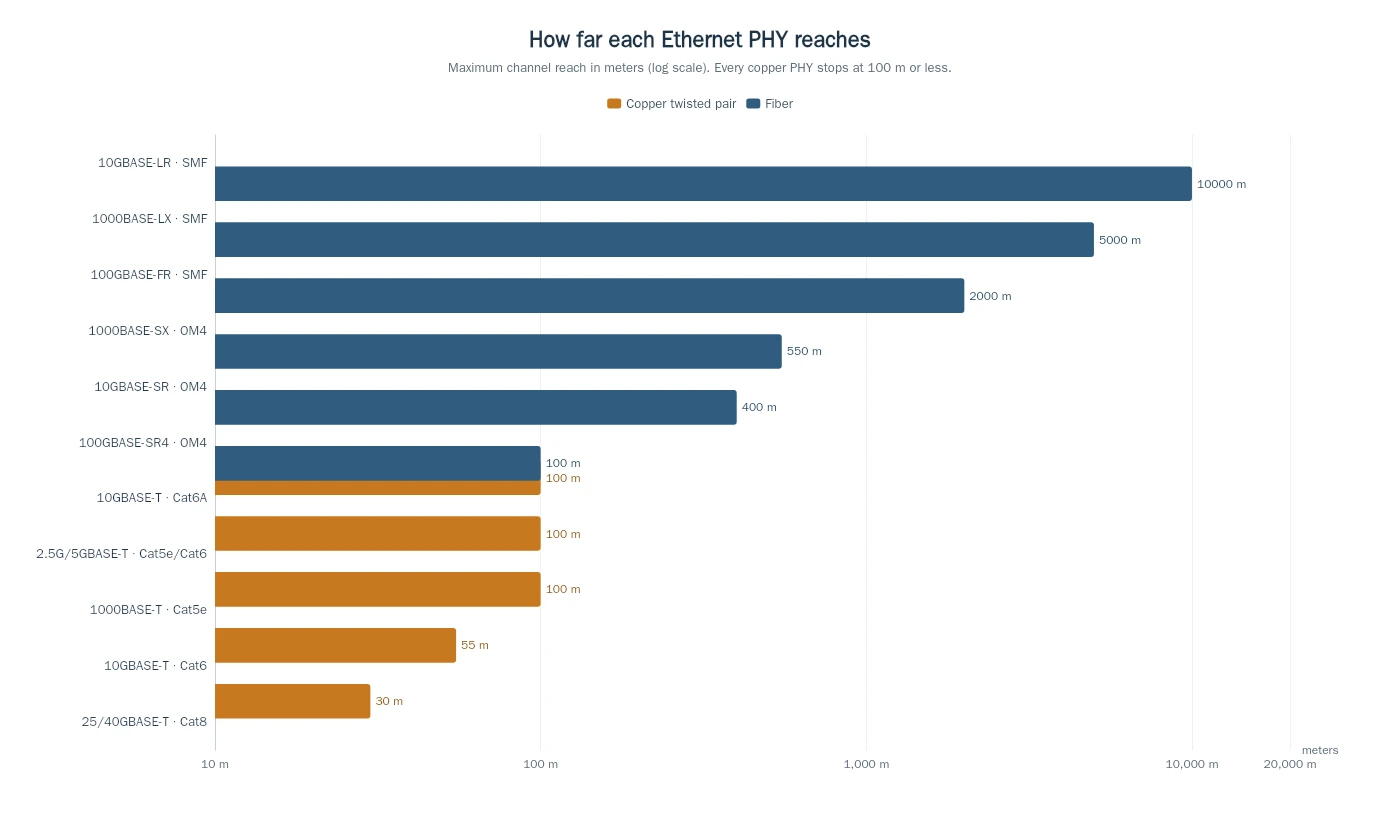
Every copper PHY in that chart stops at 100 meters or less, and the limits tighten as speed rises:
PHY | Medium | Maximum reach | Where you meet it |
|---|---|---|---|
1000BASE-T | Cat5e or better | 100 m | Desk drops, cameras, access points |
2.5G/5GBASE-T | Cat5e / Cat6 | 100 m | Wi-Fi 6/7 access point uplinks |
10GBASE-T | Cat6A | 100 m | Server room to floor, 10G to the desk |
10GBASE-T | Cat6 | 55 m | Retrofit where Cat6 is already in the wall |
25/40GBASE-T | Cat8 | 30 m | Top-of-rack only |
1000BASE-SX | OM4 multimode | 550 m | Building backbone |
10GBASE-SR | OM4 multimode | 400 m | Data hall, campus run |
10GBASE-LR | Single-mode (OS2) | 10 km | Campus, metro, ISP |
100GBASE-SR4 | OM4 multimode | 100 m | Switch-to-switch in a hall |
100GBASE-FR | Single-mode (OS2) | 2 km | Inter-building 100G |
Two rows in that table are where real projects go wrong. The first is 10GBASE-T on Cat6: the 802.3an task force designed 10GBASE-T to run 100 m on Cat6A, but a Cat6 channel is only specified to 55 m for 10G, and a channel that passes a Cat6 certification test at 1G can still fail at 10G because the thing that limits it is alien crosstalk between neighboring cables, not the pair you are testing. The second is 25/40GBASE-T at 30 m: Cat8 is a top-of-rack medium, not a horizontal one, and specifying it to a desk buys you a cable that is thicker, stiffer, and no more future-proof than a fiber strand.
Fiber's limits are set by optics, not by the cable plant, which is why the same OS2 strand that carries 10GBASE-LR for 10 km today will carry 100G tomorrow with a different transceiver at each end. The glass itself does not care: standard single-mode fiber specified under ITU-T G.652 has been the default since the 1980s, and the attenuation and geometry limits it sets are still comfortably wider than any current link needs. That is the practical meaning of a bandwidth upgrade path: on glass you change the optics, on copper you change the cable.
Latency is the part of the fiber vs ethernet speed question the table cannot show, and it is usually misunderstood in both directions. Light in glass moves at about two-thirds of c, roughly 5 nanoseconds per meter; a signal in copper is not meaningfully slower per meter, so distance alone buys you nothing. What differs is the port: a 10GBASE-T interface spends several microseconds encoding and decoding every frame, while an optical PHY spends a small fraction of that. On a 60 m desk run nobody will ever notice. On a trading floor, a fronthaul link, or a synchronized industrial loop, those microseconds per hop are the design.
Distance: What the 100-Meter Rule Does to a Building
The 100-meter number is not a marketing convention. It is a channel specification — 90 meters of permanent link plus 10 meters of patch cords, with a patch panel in the closet where the two meet, the classic TIA-568 structured cabling arrangement — and it exists because twisted pair attenuates and because the pairs interfere with each other. Above 100 meters the signal arrives too weak and too noisy to decode at the specified error rate. The TIA's structured cabling standards define the channel; the physics decides it.
What that means in a building is not "copper is limited". It means copper decides where your telecom rooms go. A floor plate 140 meters long cannot be served from one closet at one end; it needs two, or a closet in the middle. Every closet needs power, cooling, a switch, a UPS and floor area. The cable is cheap; the room is not. This is the mechanism behind most of the ten-year cost gap between the two media, and it is why a campus with three buildings 300 meters apart ends up with fiber between them almost by default — not because fiber is faster, but because no electrician can pull a copper channel that far, and because a copper link between two buildings creates a metallic path between two ground systems that were never meant to be connected.
If the run in front of you is over 100 meters, the design question has already been answered for you: how far fiber can actually go is a matter of which optic you put on each end — 400 meters with 10GBASE-SR over OM4, 10 kilometers with 10GBASE-LR over single-mode, and further again with the extended-reach optics.
Power: The One Job Copper Still Does Better
Here is the argument that keeps copper in buildings, and it has nothing to do with bandwidth. An access point, a dome camera, an IP phone, a door controller and a badge reader all need two things: data and electricity. Twisted pair can carry both on the same four pairs. That is Power over Ethernet, and it is the single largest reason a 2026 building still has thousands of meters of Cat6A in it.
The standard has grown up in three steps, and the wattage is the whole story:
Standard | Type | Power at the source | Power at the device | What it runs |
|---|---|---|---|---|
802.3af | Type 1 | 15.4 W | 12.95 W | Phones, basic dome cameras |
802.3at | Type 2 | 30 W | 25.5 W | Wi-Fi 5 access points, PTZ cameras |
802.3bt | Type 3 | 60 W | 51 W | Wi-Fi 6E/7 access points, heated cameras |
802.3bt | Type 4 | 90 W | 71 W | Multi-radio APs, small cells, displays |
Type 3 and Type 4 draw on all four pairs, which is why 802.3bt is often called four-pair PoE. The 802.3bt task force is what moved the ceiling from 30 W to 90 W, and that move is why the device classes at the top of the table exist at all.
Fiber cannot do that. A fiber strand carries light and nothing else, so a fiber-fed access point needs a local power outlet, a DC run, or a hybrid cable with copper conductors bundled alongside the glass — which is exactly why hybrid fiber-and-power cables exist for cell sites and outdoor small cells. Indoors, at desk and ceiling scale, the honest engineering answer is usually: keep the copper for the powered device, and put fiber where the copper run is long, congested, or electrically noisy.
There is a second-order effect worth knowing before you specify 90 W PoE across a bundle: heat. Power lost in a bundled cable raises the conductor temperature, and the standards bodies publish derating rules for exactly that. A 90 W port is fine; forty of them in one conduit is a thermal calculation, not a purchasing decision.
Interference, Grounding, and the Environments That Decide It
Twisted pair is a balanced transmission line: the signal is the difference between two conductors, so an external electromagnetic field couples into both and cancels. That works well, and it is why Cat6A runs at 10G next to mains wiring in most buildings. Balance is only half the story, though: Cat6A specified near drives is normally shielded (F/UTP or S/FTP), and it is the foil plus the balance that keeps the link inside its error budget. Specify unshielded Cat6A through a cabinet full of variable-frequency drives and you have removed half the protection while keeping the price. And balance stops working when the field is strong, when the pairs are untwisted at a termination, or when the noise is common-mode — a drive on the same tray, a welding shop, a radar installation, a hospital imaging room.
Glass has no such problem, because it is a dielectric: no conductor, no antenna, no ground reference. In an industrial plant with drives and inverters, in a substation, along a rail corridor, or on a tower where the cable runs past the antenna, that difference is not a preference. It is the reason the link works.
The other half of this is grounding. Two buildings on separate earth electrodes sit at different potentials, and the moment you connect them with a copper cable you have created a path for current through the cable shield, the switch chassis and the ground system. Fiber breaks that path by construction. It also makes the link far harder to tap without detection, which matters more than most comparison articles admit — a copper pair can be tapped inductively from outside the jacket, and a glass strand cannot.
Where Copper Is Genuinely the Right Answer
Strip out the marketing and copper wins in five situations, several of which are most buildings:
Short runs to powered devices. A camera 40 meters from the switch, an access point in a ceiling void, a phone on a desk. Fiber would need a media converter, a power outlet and a transceiver at each end; copper needs a patch cord and a port that is already PoE-capable.
Existing Cat6A plant. If the cable is in the wall and passes a 10G channel test, replacing it is a capex decision with a five-figure price and no bandwidth gain. Run 10GBASE-T at 100 m on Cat6A and spend the money on the switches. The same logic applies a grade lower: Cat5e still carries 1000BASE-T and 2.5GBASE-T to 100 meters, so a working Cat5e plant with gigabit switches is not a re-cabling project — it is a candidate for one when the 10G requirement actually arrives.
Field termination by an electrician. An RJ45 plug can be terminated with hand tools by any competent low-voltage installer. Fiber needs more: fusion splicing, a pre-terminated assembly measured to the millimeter, or a field-installable connector you cleave and crimp in place. The last option is genuinely practical — it is how a lot of FTTH work gets done — but it moves the loss budget into the installer's hands, and a bad cleave is a failed link that only the tester finds. This is a labor-market fact, not a technical one, and it is decisive in projects with a fixed deadline and no fiber crew.
Rugged environments at the device end. An RJ45 with a locking boot survives being kicked, unplugged and re-plugged by staff. An LC or SC connector is cleaner and more fragile at the point of use, and the dust cap discipline is real.
Cost per port at 1G. A 1G copper port is the cheapest port in networking, and it is not close. If the requirement is 1G over 60 meters, specifying fiber is spending money to solve a problem you do not have.
If any of those five describes the run, the answer to "ethernet vs fiber" is copper, and no amount of fiber advocacy changes it.
Where Fiber Is Not Optional
The mirror image is shorter, because the cases are less ambiguous.
Past 100 meters, copper is off the table. Past 10G at any distance beyond a rack, copper is off the table — 25 and 40GBASE-T exist, but at 30 meters on Cat8 they serve a top-of-rack niche, not a building. Above 100G, copper survives only as direct-attach cables a couple of meters long inside a rack: 400GBASE-CR8 and 800GBASE-CR8 are standardized and in volume use, but every 400G and 800G link longer than a rack is optical.
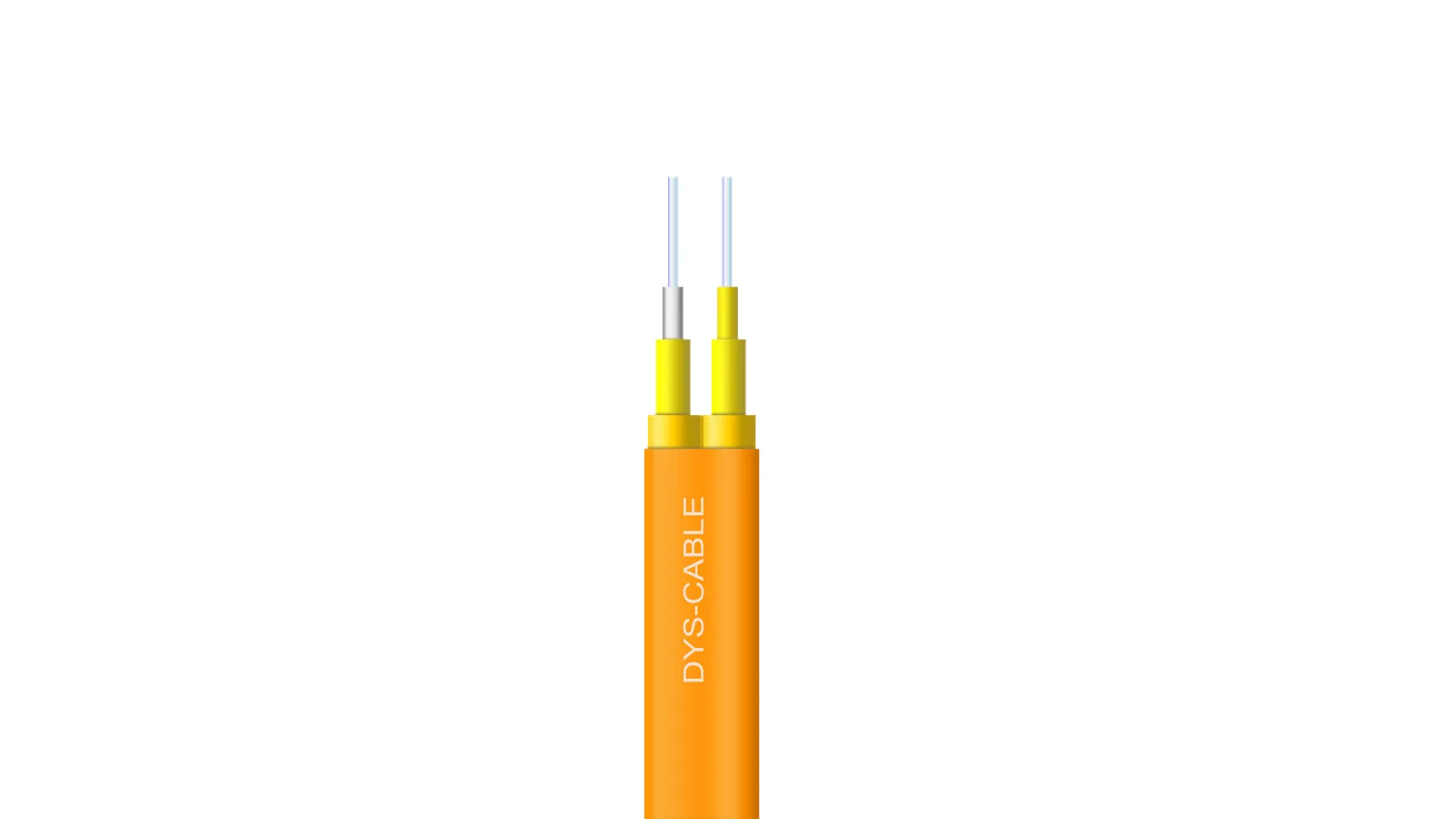
Inside a building, the case for fiber to the desk cluster is congestion and distance, not headline speed. One duplex indoor cable carries what a bundle of copper home runs would have to carry, weighs a fraction of that bundle, and reaches the far end of the floor without a closet in the middle of it. When that floor is a factory, a hospital, or anything with a substation in the basement, it is also the only option that does not need surge protection at both ends. In a data center hall the distances are short but the port count is enormous, and the same argument runs at a different scale: one MPO trunk replaces a bundle of copper, and the cable tray stops being the constraint on how many ports the hall can hold.
It is also less forgiving to install. Minimum bend radius is a real constraint rather than a datasheet formality: a duplex cable pulled hard around a steel corner or cinched with a cable tie will bend below its specified radius and lose light, whereas copper shrugs off the same treatment. Bend-insensitive fiber has widened that margin considerably, but the installation habit — generous loops, proper cable ties — is still what separates a link that tests clean at 10 years from one that tests clean at handover.
One constraint applies to both media and belongs in the specification rather than the comparison: the jacket. Inside a US building that means a plenum (OFNP) or riser (OFNR) rating, depending on the air path; in the EU it is the CPR class that decides where a cable may be installed. Glass is not automatically the safer choice here — an unrated fiber cable in a return-air plenum is as much of a code problem as an unrated Cat6A.
Then there is the access network, where the terminology gets slippery in a way that matters if you buy from operators. Most FTTH deployments carry Ethernet frames over fiber, but they are not all Ethernet end to end: GPON and XGS-PON put those frames inside GEM encapsulation, and only EPON is Ethernet all the way down. For this page the distinction is one layer below the argument — a PON and a point-to-point fiber link are built from the same glass, and the same cable specification applies to both. If you want the optical side in more depth, the fiber optics basics collection covers cable construction, grades and loss budgets; when the answer is "fiber", the next question is single-mode or multimode, and that one turns on distance and optics cost rather than on preference.
The Decision Table
Six scenarios, compressed to the only question that matters at specification time:
The rule: copper for the last 100 meters and for anything that needs watts; glass for everything past that, and for anything that must not be a conductor.
Scenario | Medium | The deciding constraint |
|---|---|---|
Camera or access point, under 90 m, needs power | Cat6A, PoE | Power delivery, not bandwidth |
10G to a desk, existing Cat6 in the wall, under 55 m | Cat6 (10GBASE-T) | Cable already paid for; verify the channel |
10G to a desk, new build, under 100 m | Cat6A (10GBASE-T) | Cheapest 10G port, and the channel fits |
10G to a desk, new build, over 100 m | OM4 fiber | The copper channel ends at 100 m; fiber does not |
Building to building, 300 m, any speed | Single-mode fiber | 100 m limit plus ground isolation |
Factory floor, drives and inverters nearby | Fiber (or shielded copper, with care) | EMI, not distance |
The table is deliberately boring. Most of the argument in this article collapses into it, and if you are specifying one run, the third column is the one to read.
"Fiber Internet" Is a Different Question
Half the searches behind this comparison mean something else entirely: fiber broadband versus the Ethernet cable inside the house. Those are not competitors either. Fiber internet is the access link from the street to your ONT; Ethernet is what carries the signal from the ONT to your router, your access points and your desk.
If your ISP has brought fiber to the premises, the answer to "do I need to rewire the house for fiber" is almost always no. You need Cat6 or Cat6A from the ONT to the router and from the router to the rooms where something needs a wire, because the Ethernet port on the ONT is copper. Fiber inside a home is a niche — long garden runs, a detached garage, a workshop with electrical noise — and it is solved with a pre-terminated drop cable and a pair of media converters, not with a rewire.
What It Costs, and Where to Read the Numbers
This page deliberately does not price the two options. A ten-year comparison has to model energy, closet space, refresh cycles and labor rates, all of which are local, and a per-meter number copied from another article is worse than no number at all. Two pages on this site do that work properly: fiber versus copper cable compares the media and their failure modes, and whether copper is really cheaper builds the ten-year model with its assumptions stated. Both are worth reading before you sign a quote.
FAQ
Is Ethernet also fiber?
Sometimes, yes. Ethernet is the standard; fiber is one of the media it runs over. 10GBASE-SR is Ethernet over multimode fiber, just as 10GBASE-T is Ethernet over twisted pair. The word "Ethernet" on a datasheet tells you the protocol, not the cable.
Do Ethernet cables have copper?
The ones people mean when they say "Ethernet cable" do — Cat5e, Cat6, Cat6A and Cat8 are copper twisted pair. But fiber patch cords are also used for Ethernet, so "Ethernet cable" is a colloquialism rather than a specification. If a supplier quotes you an "Ethernet cable" for a 300-meter run, ask which PHY they mean.
What is the downside of fiber?
Three practical ones, and one that is not about the cable. It cannot deliver power, so PoE devices need local power or a hybrid cable. Termination is a craft — fusion splicing, a pre-terminated assembly, or a field-installable connector whose yield depends on the cleave — so the skill and tooling bar sits above an RJ45 crimp. And an LC or SC connector is more fragile at the point of use than an RJ45 plug. The fourth is a service complaint rather than a cable property: fiber broadband is not available everywhere, and a shared PON can be oversubscribed at peak. That belongs to your ISP, not to the glass in the ceiling. None of the four is a bandwidth problem, which is why they are the arguments that actually decide projects.
Is Fibre Channel the same as fiber Ethernet?
No. Fibre Channel is a separate standard used for storage area networks, with its own framing and its own ecosystem. Fiber Ethernet is Ethernet running on glass. The similar names cause a lot of confusion in search results and in procurement documents.
The useful version of "ethernet vs fiber" fits in one sentence: choose the physical layer by reach, power and environment, then buy the cheapest thing that satisfies all three. Copper wins more often than the fiber industry likes to admit, in exactly the places where a device needs watts as well as bits. Fiber wins wherever the run is long, the noise is real, or the bandwidth requirement is going to grow — which, on a ten-year view, is most of the network.
If the design has already landed on glass, the indoor, outdoor and data-center cable ranges are the next thing to spec; if it has not, the two cost pages above are the more useful read.