

FTTH Access
Fiber Terminal Box vs Distribution Box vs Junction Box
Fiber terminal box, distribution box, junction box — three names, three different jobs, and a constant source of confusion on FTTH jobsites. The short version: a fiber terminal box terminates the drop cable at the subscriber end (2–24 ports, wall-mount); a fiber distribution box splits and distributes feeder fibers at the network's distribution point (8–144 ports, often with a PLC splitter inside); and a fiber junction box — in fiber optics, that means a splice closure — protects the fusion splices that join two outdoor cables together. Choose by network position, not by catalog listing. This guide breaks down each box, where it belongs in a fiber-to-the-home network, and how to pick the right one for your build.
What Is a Fiber Terminal Box?
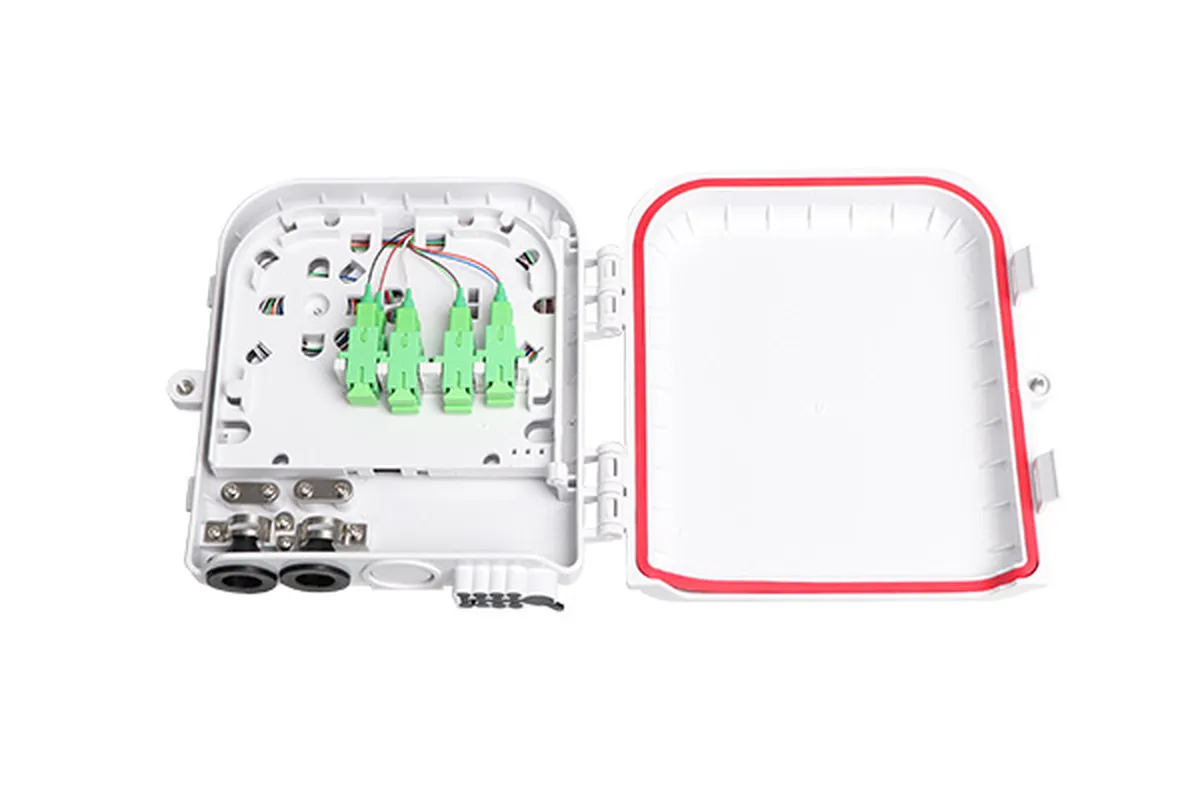
A fiber terminal box (also called an FTTH termination box, optical terminal box, or drop terminal) is the small enclosure that ends the fiber run at the subscriber's premises. One side receives the drop cable; the other side presents a row of adapter ports (SC, SC/APC, or LC) where the ONT patch cord plugs in. Inside, the incoming fiber is fusion-spliced to pigtails, and the splice is stored on a tray — so the box is doing three things at once: splicing, distributing, and protecting the fiber in the last few meters of the network.
Terminal boxes are deliberately compact. Typical capacity runs from 2 to 24 ports, with 4, 8, and 12 as the most common sizes for single-family homes. Most are wall-mounted indoors, but weatherproof versions with cable glands also sit on exterior walls and poles. Because the fiber bends tightly inside such a small body, boxes pair naturally with bend-insensitive drop cable (ITU-T G.657 fiber), which tolerates the small radii without measurable loss. Two structural features matter at this size: a dedicated lower layer for splice storage, and an upper layer for cross-connecting and distribution — the design keeps the fragile fusion splices away from the connectors you touch during installation and maintenance.
If a terminal box sounds like a mini optical distribution frame (ODF), that is exactly what it is — scaled down to one subscriber. For a quick visual reference, the DYS FTTH-006 series covers this category in 2-, 4-, 6-, 8-, 12-, 16-, and 24-port versions (models FTTH-006, 016, 022, 019, and 015), with fiber entry from the bottom or side and wall- or pole-mount kits included.
What Is a Fiber Distribution Box?
A fiber distribution box sits one or two steps back from the subscriber — at the fiber distribution point (FDP) where one feeder fiber fans out to serve many homes. It is the enclosure that houses the PLC splitter, joins feeder and drop fibers, and provides a protected junction between the outside plant and the last-mile drops.
Distribution boxes are bigger, tougher, and more varied than terminal boxes. Port counts run from 8 to 144, and the family splits into recognizable sub-types:
- Sub boxes (low count, 8–9 cores) — small weatherproof enclosures that connect a feeder to a handful of drops.
- Hub boxes (16–144 cores) — the main distribution node for an MDU corridor, a pole cluster, or a small street cabinet; they integrate splicing, splitting, distribution, fiber storage, and cable clamping in one unit.
- Multiport service terminals (MSTs) — pre-terminated boxes with hardened outdoor connectors (ODVA, Optitap-style, or Mini SC), so drops plug in without any splicing in the field.
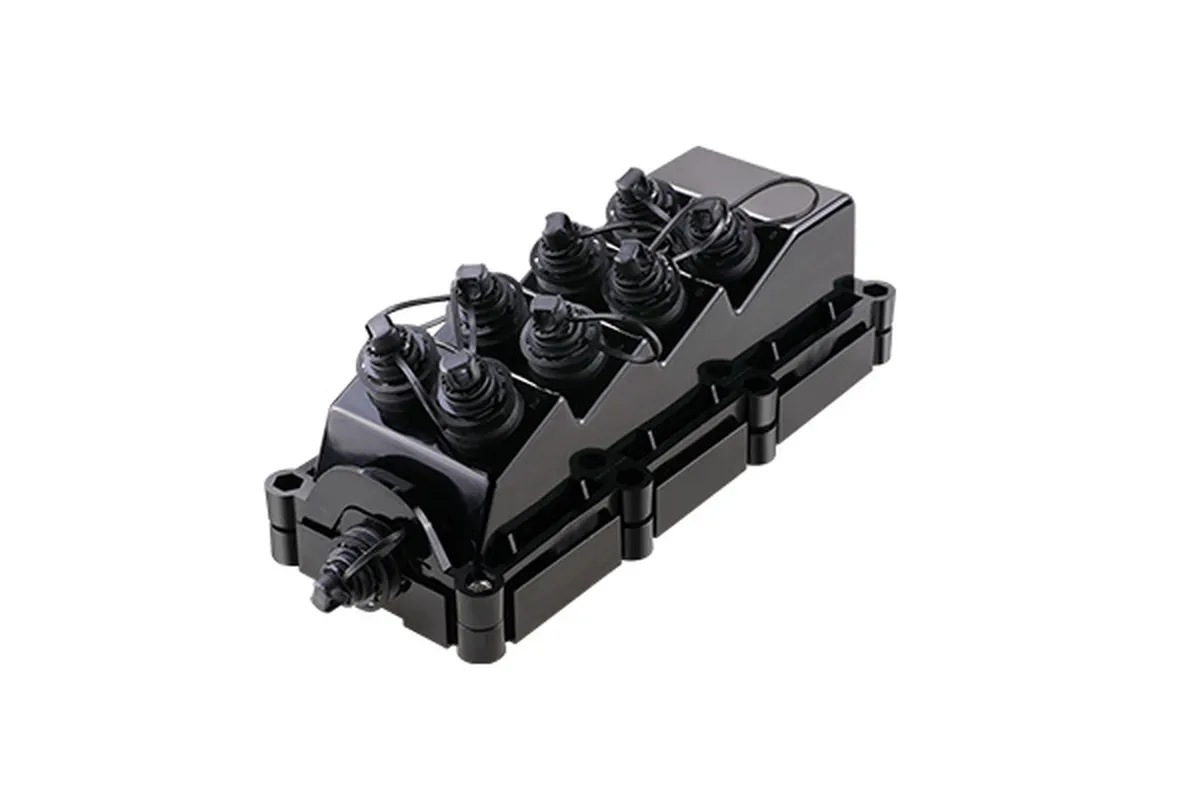
The outdoor versions are IP65 or IP68 rated. That rating is worth taking seriously: IP65 means dust-tight and protected against water jets, while IP68 adds continuous immersion — the difference between a box that survives a rainy season and one that survives a flooded manhole. Material matters too; engineering plastics (PC+ABS) dominate, and flame-retardant grades (UL94-V0) are available for indoor and riser placements. A well-specified distribution box will also carry a splitter slot — commonly 1:8 or 1:16 for PON — so the split happens where the fiber fans out, not back at the central office.
As a concrete example of the family, DYS builds the FTTH-061 sub box (8–9 cores, IP68, drop leaf that takes 1:8 and 1:9 tube splitters), the FTTH-103 hub box (16 cores, IP65, anti-theft lock, wall or pole), and the FTTX-A MST (4/8/12 cores, IP68, hardened ports). If you want to understand how the splitter inside these boxes divides the signal, our PLC splitter guide covers the ratios and loss math.
What Is a Fiber Junction Box?
Here is where the terminology gets dangerous — and where most online explanations go wrong. If you search "fiber optic junction box," you will find articles that answer with electrical junction boxes: metal or plastic enclosures that join copper wires with wire nuts. That is not what you are looking for, and it is not what your network needs.
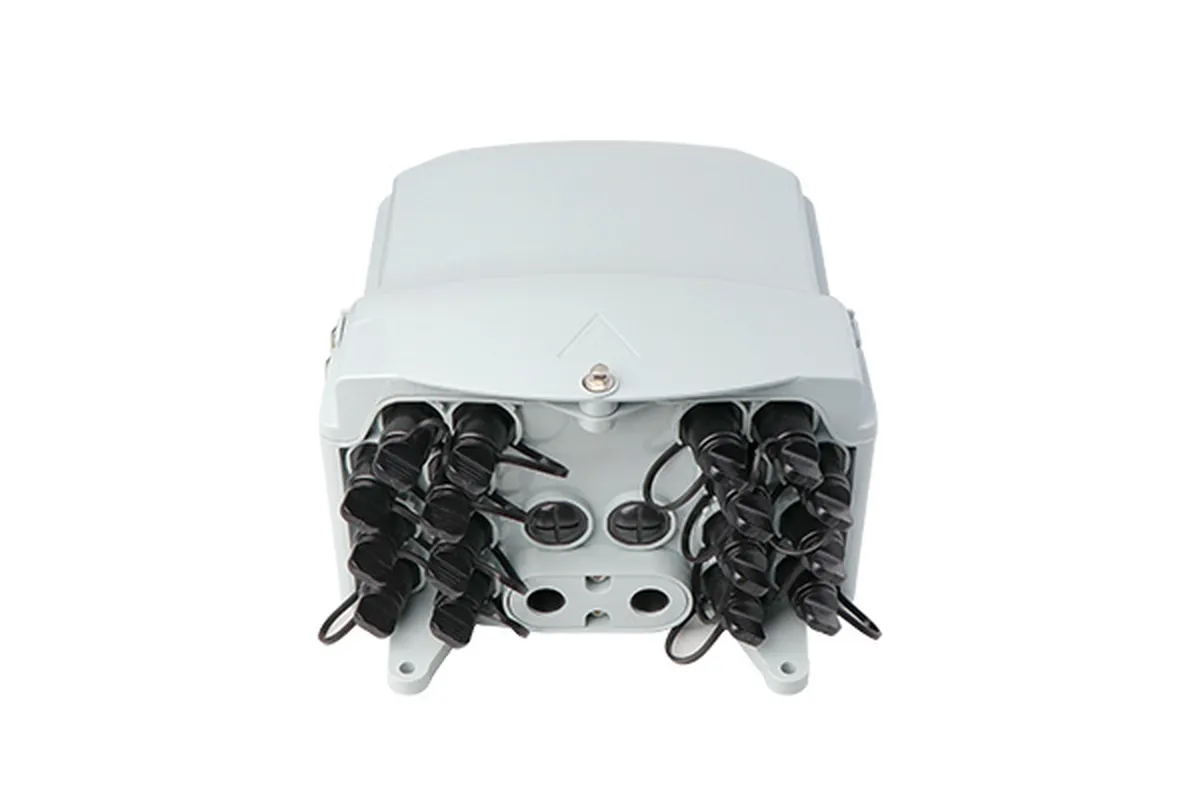
In fiber optics, a junction box means a splice closure (also called a fiber optic splice closure, splice box, or fiber optic joint closure): a sealed enclosure that protects the fusion splices where two outdoor cables meet. This is the box you see on aerial poles, in manholes, or buried at cable handholes, joining feeder cable to feeder cable or feeder to distribution cable along the route. Inside, splice trays hold the individual splices, organize slack fiber with controlled bend radius, and keep the fiber protected from water, rodents, and mechanical stress for the life of the network. FS Community's explainer on fiber optic splice closures shows the interior layout if you want the tray-level detail.
The distinction matters because the three names get used interchangeably by suppliers even though the hardware is not interchangeable: a junction box (splice closure) is for cable-to-cable splices along the route; a terminal box is for ending the fiber at a subscriber; a distribution box is for fanning out one fiber to many. If your supplier offers you a "junction box" for the subscriber end of a drop, they are describing the wrong product — which is exactly the kind of mismatch that shows up on site as a missing part.
Two more things worth knowing about the fiber junction box. First, closures are usually rated IP68 because they sit in the harshest environments of the network. Second, they are sized by fiber count (from 24 to 288 cores for distribution closures) and by application — aerial, underground, or duct. When you see an FTTH project talking about "splice points" and "closure kits," this is the box they mean. And if you are deciding whether to splice at all — or to use mechanical splices or field-installable connectors instead — our comparison of fusion splicing versus other connectorization methods walks through the trade-offs per application.
Fiber Terminal Box vs Distribution Box vs Junction Box: Key Differences
If the definitions still blur together, the table below is the one to bookmark. It compares the three boxes across the dimensions that actually drive procurement decisions.
Dimension | Fiber terminal box | Fiber distribution box | Fiber junction box (splice closure) |
|---|---|---|---|
Where it sits | Subscriber premises (indoor wall, exterior wall, pole) | Distribution point — street cabinet, pole cluster, MDU corridor | Along the cable route — aerial, underground, manhole |
What it connects | Drop cable → ONT patch cord | Feeder cable → multiple drops | Cable → cable (feeder/distribution trunks) |
Core job | Terminate and protect the end of the fiber | Split, splice, and distribute to many subscribers | Join and protect fusion splices between cables |
Port count | 2–24 | 8–144 | 24–288 (fiber capacity, not ports) |
Splitter inside | Rare (1:2 at most) | Common (1:8 / 1:16 PLC slot) | No |
IP rating | IP20 (indoor) to IP65 (outdoor) | IP65–IP68 | IP68 typical |
Mounting | Wall or pole, indoors or out | Wall, pole, aerial, pedestal | Aerial, underground, duct, manhole |
Where they sit in the network
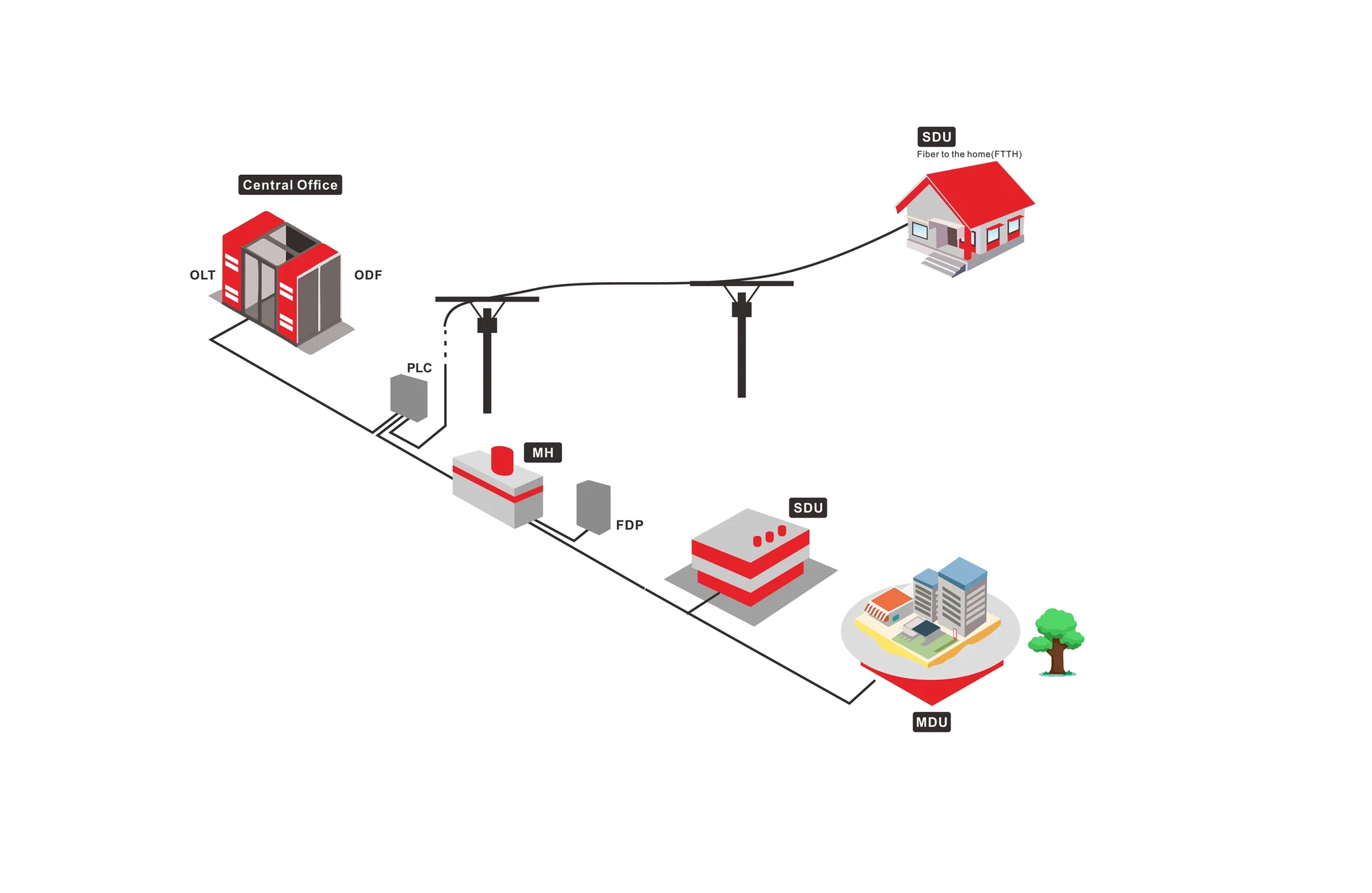
Think of the fiber path as a chain: central office (OLT) → feeder cable → distribution point → drop cable → subscriber (ONT). The junction box lives in the first half of that chain, protecting feeder splices; the distribution box lives at the pivot point where one fiber becomes many; the terminal box closes the chain at the subscriber. Nothing substitutes for another because they guard different physical jobs.
Port count and function
Port count is the fastest tell. Two to twenty-four ports and it is a terminal box; eight to a hundred forty-four and it is a distribution box; a closure has no adapter ports at all — just cable entry ports and splice trays. If a product sheet lists "ports," it is one of the first two; if it lists "splice capacity," it is a closure.
Environment and protection
Indoor terminal boxes can get away with basic splash protection, but anything outdoors needs IP65 at minimum — and IP68 where flooding or condensation is possible. Distribution boxes and closures are outdoor equipment by definition, so their rating and material (PC+ABS, UV-stabilized, flame-retardant where required) are part of the spec, not an afterthought.
Mounting and installation
Terminal boxes are installed by the drop crew in minutes with a wall bracket. Distribution boxes need planning — cable clamping, slack storage, and splitter placement — and are mounted on poles, walls, or in pedestals. Closures are lashed to strands or buried, and they are opened and re-entered over the network's lifetime, which is why re-enterable designs with proper gaskets are worth paying for.
The whole FTTH picture — from OLT to ONT, and where every enclosure fits — is laid out in our FTTH deployment guide, which is the hub for this series.
Where Each Box Belongs in an FTTH Network
A typical PON (passive optical network) deployment uses every one of these boxes, usually in a single build. Follow the fiber from the central office and the pattern is clear:
- Central office — the OLT transmits downstream light into a feeder cable, which runs to the service area.
- Route splices — wherever feeder sections join, a fiber junction box (splice closure) protects the splice. A 10 km feeder route may have several.
- Distribution point — the feeder arrives at an FDP, where a fiber distribution box holds the PLC splitter (1:8, 1:16, or 1:32) and fans out into distribution fibers and drops. In a multi-dwelling unit, this box sits in a corridor or basement serving the whole building.
- Subscriber — the drop cable enters the premises and terminates in a fiber terminal box; the ONT connects to the box with a short patch cord.
Two network shapes change which boxes dominate the bill of materials:
- Single-family (SFU) build: one small terminal box per home, one distribution box per 8–32 homes at the street cabinet or pole, and closures wherever feeder cable sections join.
- Multi-dwelling (MDU) build: distribution boxes per floor or per riser, plus a main hub box feeding them. Because indoor riser spaces are tight, this is where pre-terminated MSTs and compact hub boxes earn their keep — and where the guide to FTTH deployments in MDUs is the right next read.
The diagram below shows the end-to-end architecture with the boxes in context.
The drop cable itself — the piece that connects the distribution point to the terminal box — is where most field failures happen, so choosing it correctly matters as much as the boxes. Our guide to FTTH drop cable types covers flat, self-supporting, and round drop constructions, including how drop cable termination into the terminal box affects signal quality.
How to Choose the Right Box for Your FTTH Build
Work through three questions in order and the right product class falls out. This framework works whether you are buying for one house or a thousand.
1. Where does this box sit in the network? Subscriber end → terminal box. Distribution point → distribution box. Between two outdoor cables → junction box (splice closure). If the answer is "I don't know yet," the network design comes first — the box is downstream of the plan.
2. How many fibers or subscribers does it serve? One subscriber (2–4 ports) or a few (up to 8) → terminal box territory. A dozen to a hundred forty-four → distribution box territory, and pick sub box (8–9 cores), hub box (16+), or MST (pre-terminated) based on whether the drops will be spliced or plugged in. Long cable runs with many route splices → size the closures to the cable's fiber count (24/48/96/144/288-core options are standard).
3. What environment will it live in? Indoor and dry → IP20 terminal box is fine. Outdoor wall or pole → IP65 minimum, IP68 if exposed to standing water. Aerial, underground, or manhole → IP68 closure or distribution box, with UV-stabilized material and a re-enterable seal. Check the cable type too: bend-insensitive drop cable per ITU-T G.657 keeps small enclosures loss-free, and the network standard (e.g. GPON per ITU-T G.984.1) sets the splitter ratio your distribution box needs to house.
Once the class is settled, the shopping list is short: box + adapter panel (SC/APC is the FTTH default because of its low reflectance, per the optical fiber connector reference) + splice trays + pigtails + cable glands + mounting kit. For a full overview of the fiber-to-the-home architecture these boxes plug into, Wikipedia's Fiber to the x article is a solid background read.
If you are sourcing for a project, DYS carries the whole range — fiber terminal boxes from 2 to 24 ports, sub and hub distribution boxes, and MSTs — and because the enclosures are molded in-house, port layouts, colors, and branding can be customized for volume orders without a separate mold vendor in the loop.
FTTH Box Naming Confusion: Sub Box, Hub Box, MST, NID, and Splice Closure
Half the difficulty in buying these boxes is that every supplier uses different words. Here is the translation table:
Term you'll see | What it actually is | Category |
|---|---|---|
Terminal box / termination box / drop terminal / rosette | Subscriber-end enclosure | Fiber terminal box |
Distribution box / FDB | Splitter + distribution enclosure | Fiber distribution box |
Sub box | Small (8–9 core) distribution box | Fiber distribution box |
Hub box | Larger (16–144 core) distribution node | Fiber distribution box |
MST (multiport service terminal) | Pre-terminated distribution box with hardened connectors | Fiber distribution box |
NID (network interface device) | Subscriber demarcation enclosure | Terminal-box adjacent |
Splice closure / joint closure / splice box | Cable-to-cable splice protection | Fiber junction box |
Electrical junction box | Copper-wire enclosure — not fiber | None of these |
When a datasheet or a colleague uses a name not in this table, map it back to the physical job:
Does the box terminate a subscriber, distribute to many, or join two cables? The answer — not the label on the datasheet — determines what you actually need.
FAQ
What is a fiber terminal box? A small enclosure (2–24 ports) that terminates the FTTH drop cable at a subscriber's premises, splicing incoming fiber to pigtails and presenting adapter ports for the ONT connection.
What is the purpose of a fiber distribution box? To house the PLC splitter and fan one feeder fiber out to many subscribers at the network's distribution point, protecting splices and managing drop cables in a weatherproof enclosure (IP65/IP68).
What is a fiber junction box called? In fiber optics it is called a splice closure (or fiber optic joint closure) — a sealed enclosure that protects fusion splices between outdoor cables. It is not the electrical junction box used for copper wiring, which is a common mix-up in search results.
How much does a fiber optic termination box cost? Prices vary widely with port count, IP rating, material, and order volume — from a few dollars for a basic indoor 4-port unit to substantially more for IP68 MSTs with hardened connectors. Because telecom hardware is almost always quoted against specifications, there is no reliable list price; request quotes with your port count and environment instead.
Can a junction box replace a terminal box? No. A splice closure has no adapter ports and no subscriber interface; a terminal box has no splice capacity for large cable counts. They protect different parts of the network and are not interchangeable.
What does a fiber optic junction box do in a PON? In a passive optical network, junction boxes (closures) protect the fusion splices along feeder and distribution routes, keeping the splices dry and strain-free so the network's loss budget stays intact from the OLT to the subscriber's terminal box.
Choosing the right box comes down to position, port count, and environment — not brand vocabulary. Terminal boxes end the fiber at the subscriber, distribution boxes split it at the distribution point, and junction boxes (splice closures) protect the splices along the way. Decide which job your build needs, match the port count and IP rating, and the rest is straightforward procurement. When you are ready to spec, the fiber terminal box product line and the FTTH deployment guide linked above are the two pages to keep open — and our team can size a bill of materials for your next project on request.