
Compliance
How to Verify a Fiber Cable Supplier's UL Listing
Every fiber cable RFQ these days arrives with "UL Listed" somewhere in the supplier's pitch. The pitch is cheap. The file number behind it is not — and that number is the only part you can actually check. This guide walks through how to verify UL certification claims from a fiber cable supplier in four checks you can run yourself, using UL's own tools. Count on ten minutes per supplier once you know where to look.
Before you start: what a UL Listing is — and what it is not
A UL Listing is a product-level safety certification: a specific cable construction, evaluated by UL Solutions (Underwriters Laboratories) against a specific UL standard — the same testing and certification machinery behind UL's fiber optic performance testing services — with the manufacturing site and the file number recorded in UL's certification database. It is not a factory-wide "UL-certified company" badge, and it is not transferable between product lines. A supplier can hold a fully valid UL file for one cable family while shipping another family with no listing at all.
Two terms you will meet in every document exchange: UL Listed and UL Recognized. Listed means the finished product was evaluated for its end use. Recognized (the component-recognition program, marked with a small "RU") means a component was evaluated for use inside a larger end product. For finished fiber optic cable you want Listed; Recognized matters mostly when you buy components such as connectors or fan-out kits. We come back to this distinction in Step 3.
One more thing to set expectations: UL listings are not forever. Files are maintained through a follow-up inspection program, and a listing can lapse or be terminated. "It was UL listed" is a different statement from "it is UL listed today." Verification is not a one-time checkbox — it is a habit for every new order.
Step 1: Get the UL file number and the mark from the cable
Ask the supplier for the UL file number and, better, for a photo of the actual cable jacket. The jacket printing is where UL mark verification starts: a genuine UL-listed fiber optic cable carries the UL certification mark plus a file number and a cable designation printed on the outer jacket, typically repeated on the reel label and the carton.
The file number is usually a letter-plus-digits code such as E123456 (an "E" number). UL assigns file numbers to the company, and one file can cover several products — which is exactly why the file number alone proves nothing until you check what sits under it. Record three things before you go to the database:
- the exact file number printed on the cable (or stated in the certificate);
- the supplier's exact legal company name as it appears on the certificate;
- the exact cable designation / model you intend to buy.
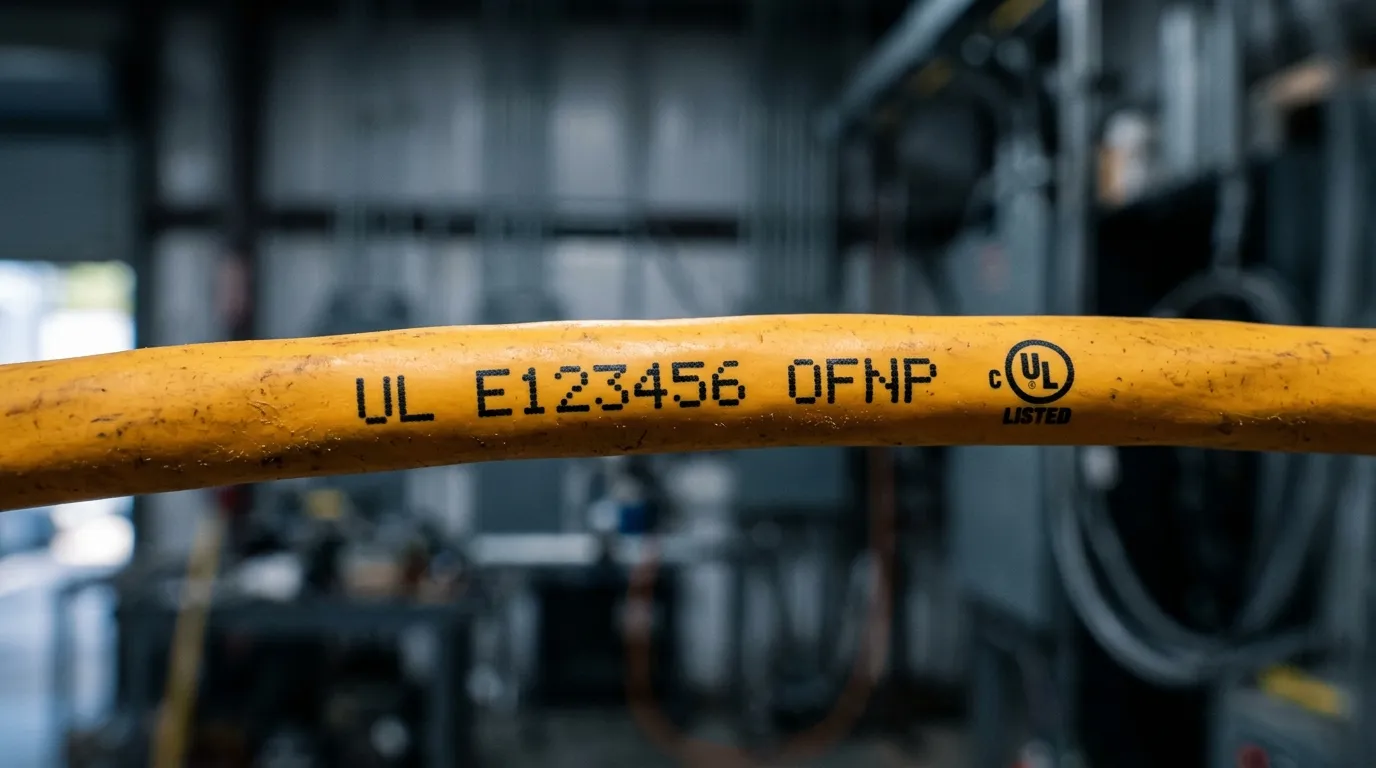
Figure: the jacket printing is the starting point — UL mark, file number, and cable designation all live in one line of ink.
If the supplier cannot produce a file number, or the cable shows no marking at all, stop here. That is the first red flag, and it is also the cheapest one to catch. No file number, nothing to verify.
Step 2: Look up the file number in UL Product iQ
UL's public certification database is called UL Product iQ (productiq.ulprospector.com). This is the authoritative tool for a UL file number lookup — a free account is enough for everything in this guide. UL's certificates search (ul.com/cere-search-certificates) covers the same records if you prefer a second route; the walkthrough below works on both.
The lookup, step by step:
- Create a free Product iQ account and sign in. Verification happens on UL's own infrastructure, not on a screenshot the supplier sent you.
- Search by file number. Enter the E number exactly as printed. If the search returns nothing, try the company-name search to see whether the company has any active file — a supplier that claims UL certification but has no retrievable file is telling you something.
- Confirm the company name. The record's company name must match the supplier's legal name. A file that belongs to a different company — or to a trading name the factory cannot document — is a borrowed or resold certification.
- Open the listing and check the product scope. Look at the category code (CCN) and the listed cable types. For fiber optic cable you expect to see the optical fiber cable category and the standard it was evaluated to (UL 1651 for optical fiber cable — more in Step 3).
- Check the status field. Product iQ records show whether a listing is current. An Active status means the file is live and under follow-up; a retired or expired status means the certification has lapsed, whatever the supplier's brochure says.
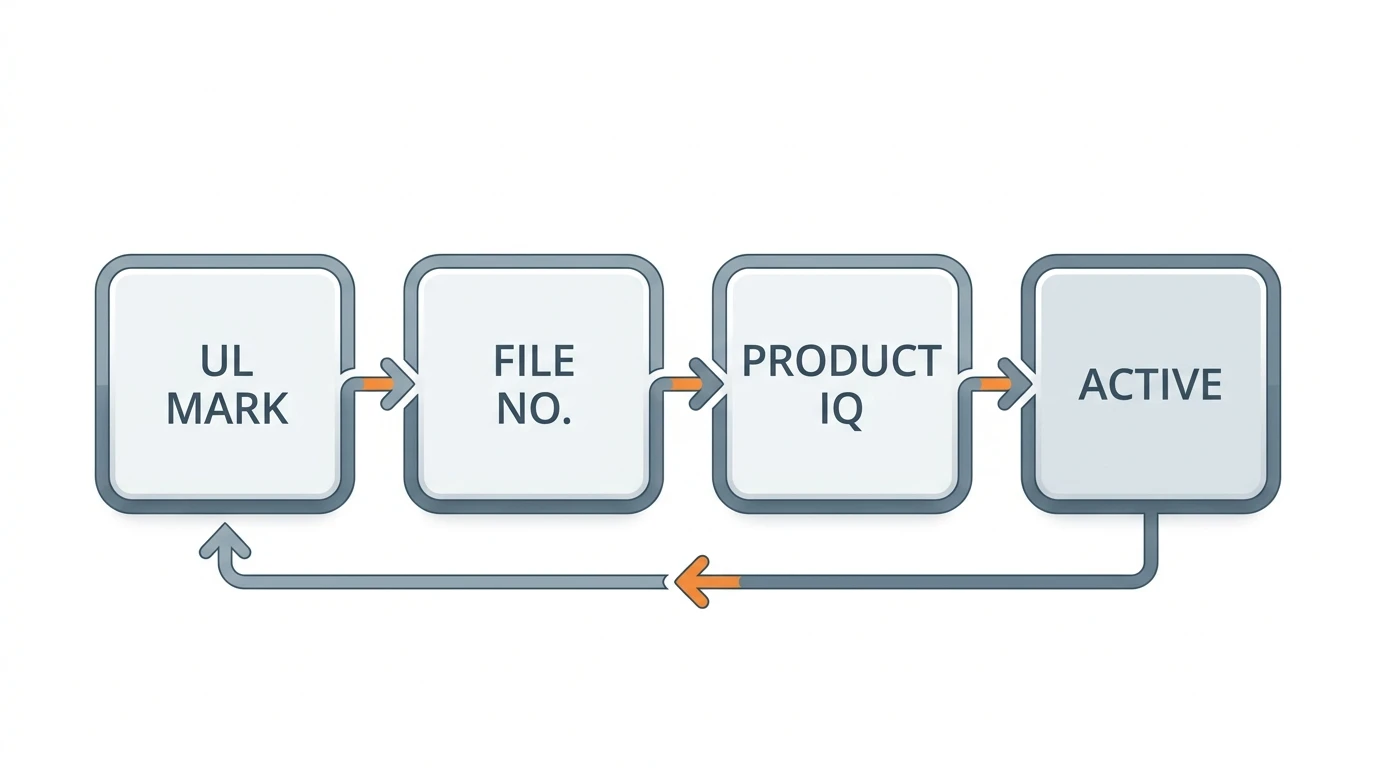
Figure: the verification loop in one picture — mark to file number to database to status.
One freebie while you are in the database: people often ask whether UL standards can be read without paying. UL standards are published by UL Standards & Engagement, and current editions can be viewed through the UL Standards catalog; the Product iQ record itself tells you which standard edition your cable was evaluated to, which is usually the detail that settles a dispute between buyer and seller.
Step 3: Match the listing to the exact cable: standards and jacket markings
A file number that resolves to a listing is not the same as a listing for your cable. This is the step where most real-world verification failures happen, because the supplier's paperwork and the physical cable drift apart.
The standards side is simple for fiber. The relevant safety standard for optical fiber cable is UL 1651 (Standard for Optical Fiber Cable); copper-based communications cable is listed under UL 444 (Standard for Communications Cable); and some cable types carry appliance-wiring-material ratings under UL 758. Jacket markings follow the same family: OFNP (optical fiber, nonconductive, plenum), OFNR (riser), and OFN (general purpose) tell you the fire-performance rating the cable was evaluated for — the difference between plenum and riser is a building-code decision, not a preference. If you need a refresher on what each rating permits, our guide to how OFNP/OFNR and LSZH fire ratings differ covers the full ladder.
Now match three things against each other:
- The certificate: file number, company, standard, and factory code it names;
- The database record: the same fields as they exist in Product iQ today;
- The physical cable: the designation, jacket rating, and marking printed on the reel you received.
If the certificate names UL 1651 but the jacket says OFNR, or the reel marking shows a file number different from the certificate's — that is a mismatch you can see with your own eyes. The listing applies to the exact construction UL evaluated; a different jacket compound, a different strength-member design, or a different fire rating means the product in your hands was never the product in the file.
This is also where UL Listed vs UL Recognized bites in practice. If the supplier's documentation says "UL Recognized component" when you asked for a listed finished cable, the scope of what UL evaluated is narrower than what you are buying — acceptable for a component inside your assembly, not acceptable for a cable you are installing as a finished product. For a full range of finished, UL OFNP/OFNR-listed indoor fiber optic cable, see our indoor fiber cable lineup.
Step 4: Check the factory site and the listing's validity
Two checks separate a live listing from a zombie one.
Factory match. UL records name the manufacturing site (plant) that the file covers, and UL certification is site-specific — a file valid for the Huizhou plant does not automatically cover output from another factory, even of the same company. Compare the plant in the database record against where the goods actually ship from, and against the factory code printed on the reel. Buyers sourcing from a trading house should ask for the certificate of the actual manufacturing plant, not the trading entity's.
Listing currency. UL maintains listings through a follow-up inspection program — unannounced factory inspections on an ongoing basis, with sample testing — which is why a UL mark means more than a lab report dated once. If the supplier's certificate is five years old, ask for evidence the file is still under follow-up (a current test report or a renewed certificate), and confirm in Product iQ that the status is Active. Files can also be terminated by UL, for example after failed follow-up inspections or lapsed agreements. A terminated file is a hard no, however fresh the supplier's PDF looks.
Red flags: seven signs a UL claim is fake, borrowed, or stale
Some failures are visible before you touch the database. This UL certification check is what we run when a new supplier's documentation crosses the desk:
# | Red flag | How to confirm it |
|---|---|---|
1 | File number returns nothing in Product iQ | Run the lookup in Step 2; no record = no certification |
2 | File exists but belongs to a different company | Compare the legal name in the record with the supplier's |
3 | Cable type on the file ≠ cable type being sold | Check the CCN and listed products against your model |
4 | Mark looks wrong: "UL" in odd type, altered spelling, extra words | Compare with the mark on a known-listed product; UL marks have a fixed design |
5 | Only a photocopy, no original certificate or jacket photo | Ask for the jacket photo and reel label; a live listing survives this easily |
6 | Supplier refuses documentation or deflects with a certificate from another company | Treat as a stop condition; legitimate suppliers hand over paperwork routinely |
7 | Status Retired / expired, or certificate older than the file's last follow-up | Check status in Product iQ; ask for a current test report |
A fake UL certification is rarer than a stale one, but both fail the same way: at the database. Every row above resolves to a lookup you can run yourself, which is the point of this guide.
What a UL-certified fiber cable supplier should hand over
A supplier with a genuine, current UL listing should be able to produce, on request, without drama:
- The UL certificate naming the file number, company, standard, and plant;
- The corresponding test reports (for fiber optic cable, UL 1651 evaluation data — flame, tensile, and environmental test records);
- Follow-up inspection evidence — the program runs continuously, so there should be recent records, not one ancient report;
- Traceability records linking production batches to the certified construction (jacket compound, fiber count, rating).
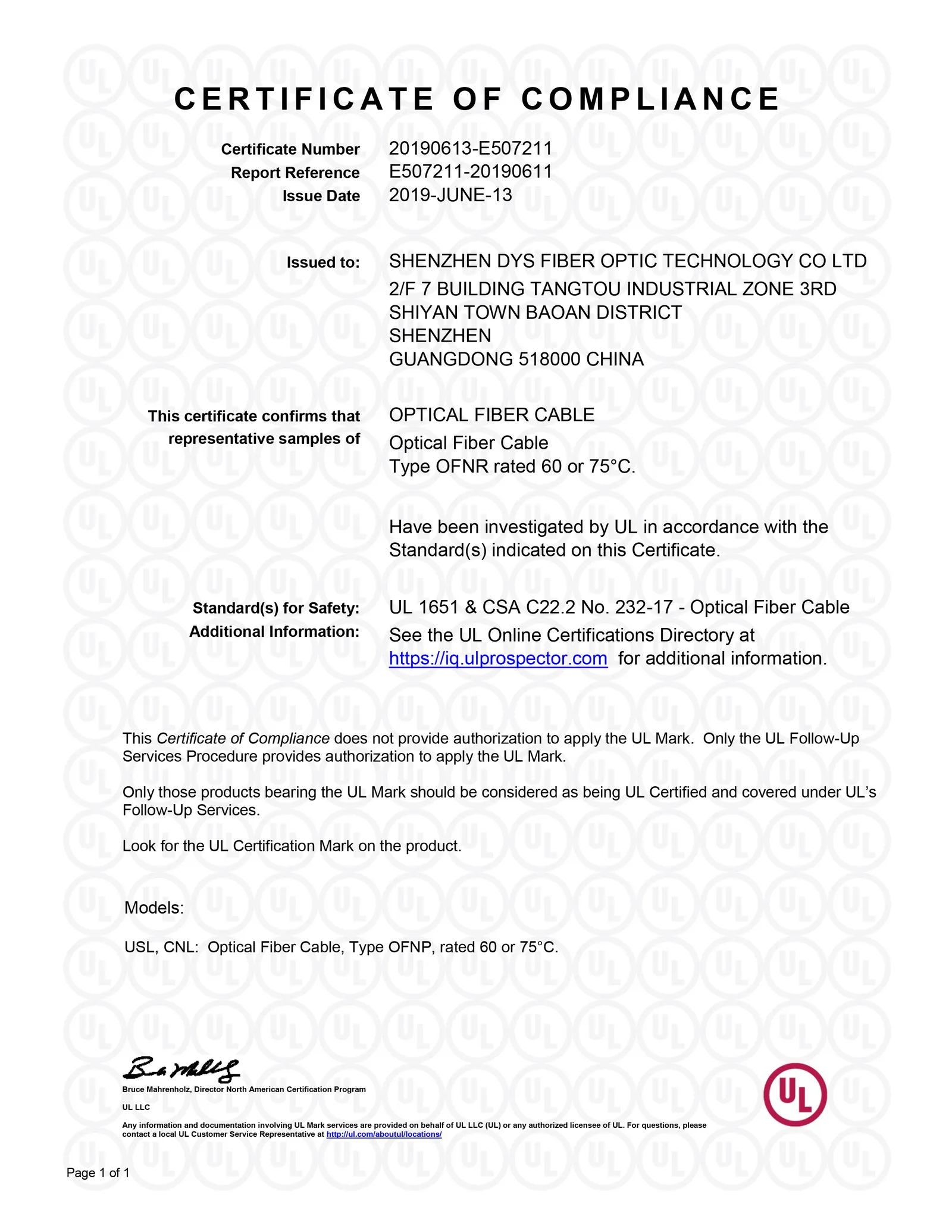
Figure: a real UL certificate — the fields circled in red are the ones you cross-check in Product iQ.
This is a standard ask in our own order flow. DYS Fiber Optic has held UL certification since 2019 (OFNP/OFNR-rated jackets, issued by UL LLC), and when a buyer asks for the file number we send the certificate, the jacket photo, and the reel label in the same reply — because we know the buyer will run the lookup in Step 2 anyway. If a supplier hesitates at this exact request, that hesitation is the answer. For the cable families this documentation covers, see our UL-listed FTTH drop cable range and outdoor fiber cable range.
UL vs CPR (EU) and Anatel (Brazil): a quick cross-reference
UL is the US market's certification language, but a supplier that sells into the EU and Latin America will be waving other documents at you too. They are not interchangeable, and they are not alternatives — they are parallel requirements per destination market:
Market | Certification | What it covers | Buyer action |
|---|---|---|---|
United States | UL Listing (UL 1651 / UL 444) | Product safety and fire performance | Verify file number in Product iQ (this guide) |
European Union | CPR (Construction Products Regulation, classes B2ca–Eca) | Reaction-to-fire performance for construction products, incl. cable | Check the DoP (declaration of performance) matches the CE-marked class |
Brazil | Anatel (homologation) | Telecommunications product approval for the Brazilian market | Confirm the Anatel homologation number covers the exact model |
The overlap that matters for procurement: a cable can carry all three, and a serious multi-market supplier will. DYS's own certificate set covers UL, CPR (B2ca, DCa, and Eca classes), and Anatel alongside ISO 9001/14001/45001 and TL 9000 — which is typical of a manufacturer that actually exports to those markets rather than printing logos on a brochure. The full map of these certifications, and how to read each one, lives in our fiber optic certifications and compliance guide.
The 60-second verification checklist
When a new supplier's quote lands, run this before you commit to samples:
If you are evaluating a UL-listed fiber optic cable supplier and want to see the paperwork before the sales call — file number, jacket photo, and test reports — ask DYS Fiber Optic for the UL documentation and run the checklist above against it. Ten minutes of verification is cheap insurance against a shipment that fails inspection on the other side of the ocean.